Odrzucone zdjęcie do wizy kanadyjskiej — przyczyny IRCC i sposób poprawienia każdej z nich
IRCC przeprowadza jedną z najbardziej rygorystycznych automatycznych kontroli zdjęć wśród anglojęzycznych agencji imigracyjnych. Rozmiar 50 × 70 mm jest większy niż standard większości krajów, a wnioskodawcy, którzy wykorzystują ponownie zdjęcie w rozmiarze Schengen lub USA, są odrzucani podczas przesyłania. Ten przewodnik obejmuje siedem najczęstszych przyczyn odrzucenia zdjęć do wizy kanadyjskiej.
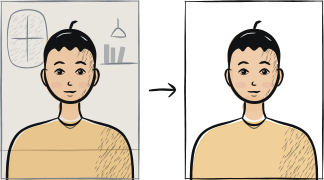
Szybka diagnoza
Kluczowe punkty kontrolne: nieprawidłowy rozmiar, proporcja głowy, tło
Trzy główne przyczyny odrzucenia przez IRCC to: ponownie wykorzystane zdjęcie o nieprawidłowym rozmiarze (35 × 45 mm lub 51 × 51 mm zamiast 50 × 70 mm), głowa poza zasadą 31-36 mm od brody do czubka głowy oraz niejednolite tło. Wszystkie trzy można naprawić, wykonując zdjęcie ponownie przy gładkiej ścianie i przekadrowując do specyfikacji IRCC.
7 częstych powodów odrzucenia
Nieprawidłowy rozmiar zdjęcia
IRCC wymaga 50 × 70 mm — większego niż Schengen (35 × 45 mm) i USA (2 × 2 cale). Ponowne wykorzystanie zdjęcia spoza Kanady nie przejdzie kontroli przesyłania.
Głowa poza zakresem 31-36 mm od brody do czubka głowy
Odległość od brody do czubka głowy powinna wynosić 31-36 mm w kadrze 50 × 70 mm. Głowa zbyt mała lub zbyt duża nie przejdzie kontroli geometrycznej.
Niejednolite tło
IRCC dopuszcza biel lub jasną szarość, ale odrzuca złamaną biel, beż, krem czy jakikolwiek cień. Wykonaj zdjęcie ponownie przy świetle naturalnym, przy gładkiej ścianie.
Okulary przyciemniane, z odblaskiem lub oprawką na oczach
IRCC dopuszcza okulary korekcyjne bez przyciemnienia, o ile oczy są dobrze widoczne, a oprawka nie zasłania żadnej ich części. Okulary przeciwsłoneczne nie są akceptowane, a odblask na szkle nie przechodzi tej samej kontroli.
Uśmiech lub nieobojętny wyraz twarzy
IRCC wyraźnie odrzuca jakikolwiek uśmiech. Usta całkowicie zamknięte.
Rozmiar pliku poza zakresem 60 KB – 240 KB
Portal IRCC oczekuje pliku JPEG o rozmiarze od 60 KB (zbyt mocno skompresowany) do 240 KB (zbyt duży). Większość zdjęć z telefonu ma 3-5 MB i musi zostać skompresowana.
Zdjęcie starsze niż 6 miesięcy
IRCC wymaga zdjęcia „wykonanego w ciągu ostatnich 6 miesięcy". Wyraźnie stare zdjęcie jest odrzucane podczas wizyty biometrycznej.
5-etapowa lista naprawcza
Zrób zdjęcie ponownie, jeśli problem tkwi w samym kadrze — cień, odblaski, wyraz twarzy; rozmiar i format pliku można poprawić na zdjęciu, które już masz.
Ustaw się 1-2 metry od gładkiej białej ściany przy świetle naturalnym wpadającym z okna.
Zdejmij okulary, odsuń włosy od oczu, obojętny wyraz twarzy.
Użyj narzędzia, które kadruje dokładnie do 50 × 70 mm z głową na poziomie 31-36 mm.
Skompresuj do pliku JPEG o rozmiarze 60-240 KB przed przesłaniem do ImmiAccount.
Często zadawane pytania
01Czy mogę ponownie wykorzystać zdjęcie do wizy Schengen do wizy kanadyjskiej?
Nie. Schengen to 35 × 45 mm; Kanada to 50 × 70 mm. Zdjęcie kanadyjskie jest większe i ma inną zasadę proporcji głowy. Użyj zdjęcia przeznaczonego konkretnie dla Kanady.
02Czy rejestracja biometryczna w VAC naprawi odrzucone przesłanie?
Nie — przesłanie zdjęcia następuje przed wizytą w VAC. Musisz pomyślnie przesłać prawidłowe zdjęcie wraz z wnioskiem, zanim zostanie wyznaczona wizyta biometryczna. Rejestracja w VAC służy do pobrania odcisków palców oraz aktualnego zdjęcia podczas samej wizyty.
Inne przewodniki po odrzuceniach





Pokaż wszystkie 33Zwiń


















Zrób zdjęcie ponownie w 2 minuty
Prześlij nowy portret — Anfas.Pro automatycznie zastosuje prawidłowe kadrowanie, tło i ramkę biometryczną oraz pokaże wynik przed płatnością.