Odrzucone zdjęcie do paszportu USA — przyczyny i sposób poprawienia każdej z nich
Odrzucenia zdjęć do paszportu USA dzielą się na dwie kategorie: automatyczne odrzucenie podczas wniosku internetowego (portal DS-11) oraz odrzucenie przez człowieka w okienku przyjmowania wniosków na poczcie. Różne przyczyny; różne rozwiązania.
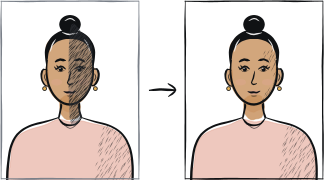
Szybka diagnoza
Kluczowe punkty kontrolne: okulary, odcień tła, rozmiar głowy
Częste przyczyny odrzucenia zdjęć do paszportu USA to: widoczne okulary (zakazane od 2016 r.), tło, które wygląda na kremowe lub złamane białe zamiast czysto białego, oraz wysokość głowy wykraczająca poza zasadę od 1 do 1⅜ cala od brody do czubka głowy.
6 częstych powodów odrzucenia
Widoczne okulary
Zakazane od listopada 2016 r., z wyjątkiem udokumentowanych przyczyn medycznych. Zdejmij okulary do zdjęcia — bez wyjątków.
Tło inne niż czysto białe
Złamana biel, krem, jasna szarość lub jakikolwiek inny odcień zostaną odrzucone. Użyj gładkiej białej ściany przy świetle naturalnym.
Wysokość głowy poza zakresem od 1 do 1⅜ cala
Odległość od brody do czubka głowy powinna mieścić się między 25 mm a 35 mm w kadrze 2 × 2 cale. Użyj narzędzia, które dopasuje tę proporcję, zamiast kadrowania ręcznego.
Uśmiech lub nieobojętny wyraz twarzy
„naturalny uśmiech" jest formalnie dopuszczony, ale wywołuje alerty niezgodności biometrycznej. Bezpieczniej jest zachować zamknięte usta i obojętne oczy.
Cień na twarzy lub na tle
Bezpośrednie słońce tworzy cienie; lampa błyskowa telefonu tworzy jeszcze twardsze cienie. Użyj rozproszonego światła naturalnego wpadającego z okna znajdującego się przed Tobą.
Zdjęcie z telefonu w trybie selfie
Szerokokątne zniekształcenie selfie zmienia proporcje twarzy. Użyj tylnego aparatu z samowyzwalaczem.
5-etapowa lista naprawcza
Zdejmij okulary. Odsuń włosy od czoła i uszu.
Ustaw się 1-2 metry od gładkiej białej ściany.
Stań twarzą do okna ze światłem naturalnym; nie używaj lampy błyskowej telefonu.
Tylny aparat, statyw lub stabilna powierzchnia na wysokości oczu, krótki samowyzwalacz.
Prześlij zdjęcie przez nasze narzędzie — kadruje je do specyfikacji DS-11 o wymiarach 2 × 2 cale i eksportuje poniżej limitu 240 KB.
Często zadawane pytania
01Portal DS-11 odrzucił moje zdjęcie z powodu „incorrect size", co to oznacza?
Portal oczekuje zdjęcia kwadratowego (proporcja 1:1) o minimalnym rozmiarze 600 × 600 pikseli. Pionowe zdjęcie z telefonu zostanie odrzucone, nawet jeśli głowa jest prawidłowa. Użyj narzędzia, które eksportuje dokładnie wymaganą proporcję boków.
02Czy mogę użyć tego samego zdjęcia do wizy i do paszportu USA?
Tak, oba używają tej samej specyfikacji 2 × 2 cale. Formularz DS-160 (wiza) i DS-11 (paszport) akceptują ten sam plik cyfrowy. Zmienia się tylko formularz, a nie zdjęcie.
03Czy poczta odrzuci moje zdjęcie, nawet jeśli przyniosę je wydrukowane?
Tak. Pracownicy przyjmujący wnioski porównują wydruk ze specyfikacją State Department w świetle jarzeniowym. Zdjęcie, które wygląda poprawnie w domu, ale wygląda na kremowe w świetle jarzeniowym, zostanie odrzucone w okienku.
Inne przewodniki po odrzuceniach






Pokaż wszystkie 33Zwiń













Zrób zdjęcie ponownie w 2 minuty
Prześlij nowy portret — Anfas.Pro automatycznie zastosuje prawidłowe kadrowanie, tło i ramkę biometryczną oraz pokaże wynik przed płatnością.