US passport photo rejected — reasons and how to fix each
US passport photo rejections split by route. If you renew online, the application uploads a digital photo and a State Department employee reviews it after submission. If you apply on paper — Form DS-11 for a first passport or a child, DS-82 by mail — you attach a printed 2 × 2 inch photo and the acceptance agent checks it across the counter. The causes differ, and so do the fixes.
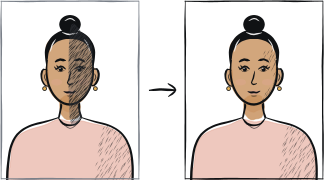
Fast diagnosis
Key checks: glasses, background, head size
The three common rejection causes for US passport photos are: any visible glasses (not permitted since 2016), a background with shadows, texture or objects on it, and head height outside the 1 to 1⅜ inch chin-to-crown rule.
6 common rejection checks
Glasses visible
Banned since November 2016 except documented medical reasons. Remove glasses for the shot — no exceptions.
Background not plain
State Department accepts a plain white or off-white wall, but it must be free of shadows, texture and objects. The usual failure is not the shade — it is a shadow behind the head or a visible seam in the wall.
Head height outside 1 to 1⅜ inches
Chin to crown must measure between 25 mm and 35 mm in the 2 × 2 inch frame. Use a tool that fits this ratio rather than cropping manually.
Expression not neutral
State Department asks for a plain, natural expression with your mouth closed — its own guidance tells applicants to avoid showing teeth. A wide smile changes the shape of the eyes and cheeks, so keep the face relaxed.
Shadow on face or background
Direct sun creates shadows; indoor flash creates harder shadows. Use diffused daylight from a window in front of you.
Photo from a phone in selfie mode
Wide-angle selfie distortion changes facial proportions. Use the rear camera with a timer instead.
5-step recovery checklist
Remove glasses. Pull hair away from forehead and ears.
Stand 1-2 metres from a plain white wall.
Face a window during daylight; do not use phone flash.
Use rear camera, eye-level tripod or steady surface, short timer.
Upload through our tool — it produces the 2 × 2 inch print for a paper DS-11 or DS-82, and a file inside the 54 KB – 10 MB range the online renewal accepts.
Frequently asked questions
01Why did the online renewal reject the photo I already cropped to 2 × 2 inches?
The online renewal does the cropping itself. State Department asks you to upload the uncropped frame with your head, shoulders and upper body visible, then repositions it inside the application. The standalone Photo Tool is for paper applications only — using its square output for an online renewal is a common cause of a rejected upload.
02Can I use the same photo for my US visa and my US passport?
The same shot works, but not the same file. Both use a 2 × 2 inch print, yet the digital rules differ: the DS-160 visa upload wants a square JPEG of 600 × 600 to 1200 × 1200 pixels under 240 KB, while the online passport renewal wants an uncropped frame of 54 KB to 10 MB and crops it for you. Export twice from the same original.
03Will the post office reject my photo even if I bring a printed one?
Yes. Post-office acceptance agents check the print against the State Dept specification under fluorescent lighting. A photo that looks correct at home but reads as off-white under fluorescents is rejected at the desk.
Other rejection guides






Show all 33Collapse













Reshoot in 2 minutes
Upload a fresh portrait — Anfas.Pro applies the correct crop, background and biometric framing automatically and shows the result before you pay.