How to take a document photo at home
You do not need a studio for most digital document-photo routes. A phone, a plain wall and even daylight are enough if the crop and biometric checks are handled correctly.
In this article · 4 sections
Quick answer
Quick answer
Use the rear camera, stand in front of a plain light wall, face a window, keep your head straight and shoot without glasses. Upload the best frame before printing or submitting.
Step-by-step
Set up facing a window
Use daylight from the front. Avoid a window behind you, ceiling lights above you or phone flash.
Use a plain wall
Stand 1-2 metres from a blank light-coloured wall so your body does not cast a shadow onto it.
Put the phone at eye level
Rest the phone on a stable surface or tripod. Use the rear camera and a short timer.
Frame the head loosely
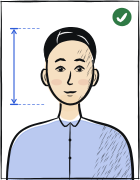
Leave space around the head and shoulders. The tool will crop to the exact country and document size.
Keep a neutral expression
Look directly into the lens, keep your mouth closed, eyes open and eyebrows relaxed.
Upload before printing
Check background, head ratio, sharpness and target pixel/file requirements before paying for a download.
What to wear
Solid darker clothing usually works best because it separates from a white or light background. Avoid white tops, uniforms, hats and large logos.
The most common mistake
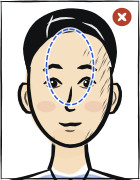
Do not use the front camera at arm length. Wide-angle selfie lenses distort the nose, ears and head proportions, which can affect biometric alignment.
Read next
all guidesPrepare the photo now
Upload a portrait and Anfas.Pro will crop, resize and check it against the selected document profile.