Quick answer: A USA passport photo must be 51 × 51 mm. White or off-white background. Head occupies 49–69% of photo height. Neutral expression, glasses prohibited. Last verified .
USA passport photo: size in mm, cm, inches and pixels
Millimetres
51 × 51 mm
Centimetres
5.1 × 5.1 cm
Inches
2 × 2″
Pixels at 300 dpi
602 × 602 px
Pixels at 600 dpi
1205 × 1205 px
USA-specific things to know
Renewal by mail (DS-82) uses the same photo as a new application: one 2 × 2 inch (51 × 51 mm) colour print taken in the last 6 months
Many Post Offices that act as Acceptance Facilities also take passport photos for a fee (around $15–20)
How passport photos are verified
US passport photos are reviewed by the State Department when the application is processed. A photo that does not meet the requirements can delay the application until a new one is sent in, so check the size, head height, background and glasses rule before printing.
Read more
The State Department also publishes a Photo Tool (travel.state.gov) for digital photos; it works on a photo you already have and does not take one. The accepted photo is digitised and embedded into the e-Passport chip per ICAO 9303, and it stays bound to the document for its validity period — 10 years for adults, 5 years for under-16s.
Choose it carefully.
Examples and mistakes
What makes USA passport photos accepted
A photo that will be accepted, next to the six most common reasons USA passport photos get rejected.
Accepted
Compliant USA passport example (51 × 51 mm)
Face centred, looking directly into the lens
Plain background — no shadow, pattern or texture
Neutral expression, eyes open, mouth closed
No glasses, no hair across the face
Top 6 USA passport rejection causes
Background shadowShadow on the wall behind the head, or background with a visible pattern or gradient
Smile / open mouthVisible smile with teeth or open mouth instead of a neutral expression
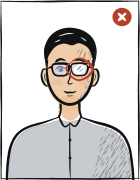
Glasses with glareGlasses with a clearly visible light reflection covering part of the eye
Hair across the faceLoose hair strands covering the eyes, eyebrows or part of the face
Eyes off-cameraEyes looking to the side instead of directly into the camera lens
Head tiltedHead tilted so the eye line is no longer horizontal
Typical rejection reasons and how to fix them
Typical reasons a photo is rejected under the rules U.S. Department of State publishes: what is wrong and what to change.
The tool puts in the required background. Stand half a metre from a plain light wall, face a window and shoot without flash — then there are no shadows on your face or on the wall.
Framing
Head: 49–69 % of the photo height
Camera at eye level, about a metre away; head and shoulders in the shot. The tool crops it to 51 × 51 mm.
Glasses
Glasses prohibited
Take them off before the shot.
Expression and gaze
Neutral expression or slight natural smile; both eyes open
Look straight into the lens with your head level; keep hair away from your eyes and eyebrows.
Print at 100% scale, borderless, and turn off fit-to-page so each photo keeps its exact size.
Where to submit your passport application
US passport applications are processed by the Department of State. Three submission channels exist — choose based on urgency, location, and whether this is a new application or renewal.
Acceptance Facility (in person, new applications)in-person
8,000+ US Post Offices, libraries, court clerk offices
The U.S. Department of State requires one color passport photo taken within the last 6 months.
The correct printed passport photo size is 2 × 2 inches (51 × 51 mm).
Head height must be between 1 and 1 3/8 inches from the bottom of the chin to the top of the head.
The photo must use a white or off-white background without shadows, texture or lines; eyeglasses must be removed except documented medical cases.
Questions
Frequently asked questions
Yes — the new USCIS Application Support Center (ASC) capture mandate from December 12, 2025 applies to immigration forms (I-485, I-765, N-400, N-600), not to passport applications. For passport forms DS-11 (new) and DS-82 (renewal), you still submit your own 2×2 inch (51×51 mm) printed photo with a white background.
An Acceptance Facility (8,000+ US Post Offices, libraries, court clerks) accepts first-time applications and minor applications; routine processing takes 6-8 weeks. A Passport Agency (26 locations nationwide) handles urgent travel needs (within 14 days) by appointment only. Both require the same photo standard.
No. The Photo Tool at travel.state.gov works on a photo you have already taken; it does not produce one. The photo itself still has to meet the requirements above: head centred, plain white or off-white background, no glasses or shadows.
No — the photo specification is identical for routine and expedited applications. Expedited service only changes the processing speed (2-3 weeks instead of 6-8) and adds a $60 fee on top of the standard $130. Same 2×2 inch photo, same white background, same 6-month recency rule.
The USA passport photo must be 51 × 51 mm. The head must occupy 49–69% of the photo height. For digital upload, use 600 × 600 px.
White or off-white background. Behind you there should be only a plain wall: no pattern, shadows or objects. Any light wall at home will do — the tool sets the exact background colour.
Most passport offices ask for a photo taken within the last six months. It should look like you today: after a new haircut or beard, take a new one.
We refund the payment in full. Email us within 14 days of purchase with your order number and the rejection notice from the USA authority — the refund policy page has the details.
Glasses prohibited, except for rare documented medical exceptions.
51 × 51 mm = 5.1 × 5.1 cm = 2 × 2 inches. At 300 dpi that is 602 × 602 pixels; at 600 dpi, 1205 × 1205 pixels.
Religious reasons only; must not cover the facial oval. The face must stay fully visible from chin to forehead and on both sides, with no shadow across it.
Yes. The same 51 × 51 mm format and head size apply to: green card, naturalization certificate, work authorization (EAD).