Quick answer: A USA visa photo must be 51 × 51 mm. Plain white or off-white background without shadows or foreign objects. Head occupies 50–69% of photo height. Neutral expression, glasses prohibited. Last verified .
Glasses banned in new visa photos since November 1, 2016, except rare medical cases (e.g. recent ocular surgery) with a signed statement from a medical professional; frames must not obscure the eyes, no glare or shadows on the lenses
Digital upload 240 KB ceiling is server-enforced — phone-camera JPEGs at default quality usually exceed this
Square aspect (1:1) is mandatory — most country visa photos are not square; this trips applicants
Both digital (DS-160) and printed 2×2 (interview) required — use same session for consistency
How visa photos are verified
US visa photo verification is run by the US Department of State Consular Affairs under 9 FAM 403.9. The DS-160 online application (used for non-immigrant visas — B1/B2, F1, H1B, etc.) requires a digital photo at upload time; the printed 2×2 inch photo is also required at the consular interview.
Read more
Verification has three layers. First, the DS-160 upload page runs an automated check — JPEG, 600×600 to 1200×1200 px, square aspect, under 240 KB, sRGB colour space.
Files outside this band are rejected server-side before submission proceeds. Second, the consular officer at the visa interview compares the printed photo against the digital file uploaded.
Third, on arrival at any US port of entry, the photo is matched against live face capture (CBP biometric exit since 2022). US visa-specific: head must occupy 50-69% of the frame (slightly looser than passport's 50-69% to accommodate wider portraits).
The 240 KB digital ceiling is strict and unforgiving — most phone-camera JPEGs at default quality exceed it. Glasses have not been allowed in new visa photos since November 1, 2016, except in rare circumstances when they cannot be removed for medical reasons (e.g. recent ocular surgery) — a signed statement from a medical professional is required, frames must not obscure the eyes and there must be no glare or shadows on the lenses.
Examples and mistakes
What makes USA visa photos accepted
A photo that will be accepted, next to the six most common reasons USA visa photos get rejected.
Accepted
Compliant USA visa example (51 × 51 mm)
Face centred, looking directly into the lens
Plain background — no shadow, pattern or texture
Neutral expression, eyes open, mouth closed
No glasses, no hair across the face
Top 6 USA visa rejection causes
Background shadowShadow on the wall behind the head, or background with a visible pattern or gradient
Smile / open mouthVisible smile with teeth or open mouth instead of a neutral expression
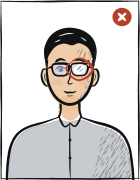
Glasses with glareGlasses with a clearly visible light reflection covering part of the eye
Hair across the faceLoose hair strands covering the eyes, eyebrows or part of the face
Eyes off-cameraEyes looking to the side instead of directly into the camera lens
Head tiltedHead tilted so the eye line is no longer horizontal
Typical rejection reasons and how to fix them
Typical reasons a photo is rejected: some follow from the rules U.S. Department of State publishes, the rest are the usual document-photo requirements. The table shows what is wrong and what to change.
Reason
Fix
Digital file outside 600×600 to 1200×1200 px / 240 KB range
Re-encode JPEG sRGB, target ~600×600 px ~150 KB
Aspect ratio not square (1:1)
Crop to 1:1 — same height and width
Colour space not sRGB (Adobe RGB or other rejected)
Convert to sRGB in any photo editor before export
Head outside 50-69% of frame
Standard US visa crop
Glasses worn (banned since November 1, 2016; rare medical exceptions require a signed doctor's statement)
Remove glasses; if they cannot be removed for medical reasons, provide a signed statement from a medical professional
Printed photo at interview doesn't match uploaded digital
Use same shoot session for both digital upload and printed copy
The tool puts in the required background. Stand half a metre from a plain light wall, face a window and shoot without flash — then there are no shadows on your face or on the wall.
Framing
Head: 50–69 % of the photo height
Camera at eye level, about a metre away; head and shoulders in the shot. The tool crops it to 51 × 51 mm.
Glasses
Glasses prohibited
Take them off before the shot.
Expression and gaze
Neutral expression, mouth closed, both eyes open
Look straight into the lens with your head level; keep hair away from your eyes and eyebrows.
Print at 100% scale, borderless, and turn off fit-to-page so each photo keeps its exact size.
Where to submit your visa application
US visa applications are processed by the US Department of State through its consular network. The DS-160 form is the primary route for most non-immigrant visa categories.
DS-160 online (non-immigrant)online
ceac.state.gov/genniv
Processing
Same-day form submission; interview slots depend on consulate (1 day to 6 months)
Cost
$185 MRV fee + reciprocal fee (varies by nationality)
After DS-160 you schedule an in-person interview at a US embassy/consulate (15 days waiver-eligible exceptions). Photo: 2×2 inch, white background, ≤240KB JPEG.
The U.S. Department of State requires visa photos or digital images to be in color, recent within 6 months, and taken on a plain white or off-white background.
The official composition rule sets head height at 1 to 1 3/8 inches, equivalent to 50-69% of total image height for digital images.
Immigrant visa printed photos must be 2 × 2 inches (51 × 51 mm); DS-160/DS-1648 applications can require a digital upload.
Eyeglasses are not allowed in new visa photos except rare documented medical exceptions, with eyes unobscured and no glare.
Questions
Frequently asked questions
Yes, but the file must meet strict server-side checks: JPEG format, ≤240 KB file size, square aspect ratio (600×600 to 1200×1200 pixels), 6 months recent. The DS-160 system rejects oversized photos at upload before a human officer sees the form. Most phone photos exceed 240 KB and need re-encoding before upload.
No. The US Department of State banned eyewear in passport and visa photos in November 2016. The DS-160 rule applies even to clear prescription glasses. Medical exceptions require a signed letter from a healthcare provider stating the glasses cannot be removed for medical reasons.
Yes. The DS-160 form requires a photo taken within 6 months of submission. Even if your appearance has not changed, you must provide a fresh photo. The previous photo on your old visa cannot be reused.
The USA visa photo must be 51 × 51 mm. The head must occupy 50–69% of the photo height. For digital upload, use 600 × 600 to 1200 × 1200 px.
Plain white or off-white background without shadows or foreign objects. The wall should be evenly lit, with no shadow around the head and no pattern. You don’t need a studio backdrop: the tool sets the right background colour.
Consulates usually ask for a photo taken within the last six months, sometimes within three. Take a new one that looks like you today.
Often yes, but not always: tourist, student, work and transit visas can have different size or background rules. Compare the requirements of each USA visa — if they match, one photo will do.
We refund the payment in full. Email us within 14 days of purchase with your order number and the consulate’s rejection notice.
51 × 51 mm = 5.1 × 5.1 cm = 2 × 2 inches. At 300 dpi that is 602 × 602 pixels; at 600 dpi, 1205 × 1205 pixels.
Religious reasons only; must not cover the facial oval. The face must stay fully visible from chin to forehead and on both sides, with no shadow across it.