Quick answer: The recommended Brazil passport photo size is 50 × 70 mm. Strictly white background. Head occupies 44–51% of photo height (31–36 mm chin to crown). Neutral expression, better without glasses. Last verified .
Brazil passport photo: size in mm, cm, inches and pixels
Millimetres
50 × 70 mm
Centimetres
5 × 7 cm
Inches
1.97 × 2.75″
Pixels at 300 dpi
591 × 827 px
Pixels at 600 dpi
1181 × 1654 px
Brazil-specific things to know
In Brazil you do not bring a photo: the Federal Police photograph everyone over 5 at the appointment. Children under 5 bring a printed 5 × 7 photo and must still appear in person.
Abroad the size depends on the consulate: 5 × 7 cm at São José, Hamamatsu and Harare, 2 × 2 inches at Chicago, 5 × 7 or 5 × 5 cm for minors at Montreal. Read your consulate's page before printing.
São José asks for 31–36 mm from chin to forehead on the 70 mm tall photo and refuses photos already used in earlier passports.
Baby photos: São José accepts a home photo if the light is good, the background is white (a sheet will do) and the eyes are open and looking at the camera — but do not crop it. Chicago says no toys or hands holding the child may appear.
Harare insists on white, not blue, and bans coloured lenses; Hamamatsu and Harare want no glasses at all, while Chicago and São José allow glasses without reflections.
How passport photos are verified
In Brazil the passport photograph is handled by the Polícia Federal (PF): its FAQ says every applicant older than 5 must be photographed during the appointment, in line with international civil aviation standards, so no photo can be brought instead; only children under 5 bring a 5 × 7 photo. Outside Brazil the application goes through a consulate of the Ministério das Relações Exteriores (Itamaraty), and there a printed photo is required.
Read more
The size is set by each consulate: 5 × 7 cm (50 × 70 mm) at São José, Hamamatsu and Harare, 2 × 2 inches (about 5 × 5 cm) at Chicago, and either 5 × 7 or 5 × 5 cm for minors at Montreal. All of them want a recent colour photo, taken from the front on a white background, with the face and shoulders fully in the frame, a neutral expression, no reflections or shadows and no sunglasses.
Examples and mistakes
What makes Brazil passport photos accepted
One compliant example next to the six most common rejection causes for Brazil passport applications. These are the differences that most often determine whether a document photo is accepted.
Accepted
Compliant Brazil passport example (50 × 70 mm)
Face centred, looking directly into the lens
Plain background — no shadow, pattern or texture
Neutral expression, eyes open, mouth closed
No glasses, no hair across the face
Top 6 Brazil passport rejection causes
Background shadowShadow on the wall behind the head, or background with a visible pattern or gradient
Smile / open mouthVisible smile with teeth or open mouth instead of a neutral expression
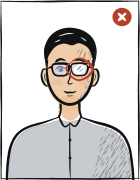
Glasses with glareGlasses with a clearly visible light reflection covering part of the eye
Hair across the faceLoose hair strands covering the eyes, eyebrows or part of the face
Eyes off-cameraEyes looking to the side instead of directly into the camera lens
Head tiltedHead tilted so the eye line is no longer horizontal
Typical rejection reasons and how to fix them
Typical reasons a photo is rejected under the rules Polícia Federal / gov.br publishes: what is wrong and what to change.
Reason
Fix
Size not the one your consulate asks for (5 × 7 cm, 2 × 2 inches or 5 × 5 cm)
Open your consulate's passport photo page and print exactly that size; Hamamatsu says photos outside its specification will not be accepted.
Background not white (blue is refused), or shadows and reflections on the face
Use a plain white background and even light with no reflections, half-shadows or shadows anywhere in the photo, as São José and Chicago require.
Glasses that reflect light, sunglasses, thick or flashy frames; a hat that is not religious
Take glasses off (Hamamatsu and Harare ask for none) or make sure the lenses do not reflect ambient light or the camera; keep the face fully visible with the eyebrows showing.
Photo too old, or one already used in an earlier passport
Take a new photo within the last 6 months; São José says it will not accept photos that were used in earlier passports.
Child photo with toys, a pacifier, bows or hands holding the child; face not fully framed
Show only the child's face and shoulders, fully in the frame, with a neutral expression, eyes open and nothing else in the picture.
The tool puts in the required background. Stand half a metre from a plain light wall, face a window and shoot without flash — then there are no shadows on your face or on the wall.
Framing
Head: 44–51 % of the photo height (31–36 mm)
Camera at eye level, about a metre away; head and shoulders in the shot. The tool crops it to 50 × 70 mm.
Glasses
Better without glasses
Take them off before the shot.
Expression and gaze
Neutral expression, mouth closed, eyes open
Look straight into the lens with your head level; keep hair away from your eyes and eyebrows.
Print at 100% scale, borderless, and turn off fit-to-page so each photo keeps its exact size.
Where to submit your passport application
In Brazil the passport is applied for at the Polícia Federal, where the photo is taken for you (children under 5 bring a 5 × 7 photo). Abroad it is applied for through the e-consular portal of the Brazilian consulate, and the printed photo goes with the form.
Polícia Federal (Brazil)in-person (by appointment)
Passport page of the Federal Police on gov.br/pf
Processing
Shown by the Federal Police when you book
Cost
Federal fee set by the Polícia Federal; see its passport page
Everyone over 5 is photographed during the appointment — no photo can be brought instead. Children under 5 bring one 5 × 7 photo and still appear in person.
Each consulate runs its own e-consular portal and photo page on gov.br/mre
Processing
Set by each consulate
Cost
Consular fee by the holder's age, paid as the consulate instructs (Hamamatsu: at Banco do Brasil with its own form)
Print the form (RER), glue the photo on it and present it as the consulate says; Chicago: 2 × 2 inches, São José, Hamamatsu, Harare: 5 × 7 cm; Montreal minors: 5 × 7 or 5 × 5 cm from a professional photographer.
Polícia Federal: every applicant older than 5 must be photographed during the appointment, in respect of international civil aviation norms; only children under 5 must bring a 5 × 7 photo.
Embassy in San José: standard ID/passport size 5 × 7 cm, colour, preferably taken within 6 months, front, white background, face and shoulders fully framed, chin to forehead 31–36 mm, no reflections or shadows; photos already used in earlier passports are refused.
Consulate General in Chicago (page updated 16 Jan 2026): 2 × 2 inches (about 5 × 5 cm), colour, taken within 6 months, front, white background, face and shoulders fully framed, neutral expression without smiling or frowning, eyes open and visible; no sunglasses or thick or flashy frames; no headwear except for religious reasons; avoid white clothes.
Consulates in Hamamatsu and Harare: one recent colour photo of 5 × 7 cm, sharp, white background (not blue in Harare), no glasses, neutral expression, eyebrows visible; Harare also excludes coloured lenses. Montreal asks for minors: 5 × 7 or 5 × 5 cm from a professional photographer, white background, no shadows, who writes the date on the back.
Questions
Frequently asked questions
5 × 7 cm (50 × 70 mm) is the size for children under 5 at the Polícia Federal and at most consulates abroad (São José, Hamamatsu, Harare). Chicago asks for 2 × 2 inches (about 5 × 5 cm), and Montreal takes 5 × 7 or 5 × 5 cm for minors. The Federal Police photograph adults and children over 5 themselves, so in Brazil you do not bring a photo.
For consulates abroad: a recent colour photo (within 6 months), taken from the front on a white background, face and shoulders fully in the frame, looking straight at the camera with a neutral expression and open, visible eyes. No reflections, half-shadows or shadows, no sunglasses or thick frames, and no hat unless for religious reasons. São José gives 31–36 mm from chin to forehead. Photos already used in an earlier passport are refused.
No. The Polícia Federal answers «NÃO» in its FAQ: everyone older than 5 must be photographed during the appointment, in respect of international civil aviation norms. Only children under 5 bring a 5 × 7 photo. If you apply at a consulate abroad, the situation is different — there you bring a printed photo in the size that consulate asks for.
The consulate pages we read name 5 × 7 cm (São José, Hamamatsu, Harare), 2 × 2 inches (Chicago) and 5 × 5 cm (Montreal minors). None of them lists 35 × 45 mm, so for a passport ask your consulate before using that size. 35 × 45 mm is the size of the Brazil e-visa photo, which is a different document.
Under 5 at the Polícia Federal, you bring a 5 × 7 photo. Show only the face and shoulders, fully framed, with the most neutral expression possible. São José accepts a home photo if the light is good, the background is white (the baby on a sheet, for example) and the eyes are open and looking at the camera — and says not to crop the photo. Chicago adds that no toys or hands holding the child may appear; São José also excludes bows and pacifiers.
The recommended size for the Brazil passport photo is 50 × 70 mm. The head occupies 44–51% of the photo height.
Strictly white background. No gradients, textures, shadows or objects behind the subject are permitted. The tool removes background shadows automatically, but starting with a flat, evenly lit wall gives the best result.
Yes. Stand in front of a flat white wall in good natural light, face the light source and use the rear camera of your phone with a 3-second timer. The tool handles the crop, background normalisation and compliance check against the Brazil biometric standard.
Most passport authorities require the photo to be taken within the last six months. Do not reuse an older portrait even if your appearance has not changed.
Anfas.Pro provides a 14-day full refund if the photo is rejected by the Brazil authority and you supply the official rejection notice. See the refund policy page for the exact process.
Remove glasses if possible; reflections not permitted. In practice, the biometric scanner at submission points flags even minor lens glare that looks fine to the naked eye. Removing glasses before shooting is the only option that eliminates the risk entirely.
50 × 70 mm = 5 × 7 cm = 1.97 × 2.75 inches. At 300 dpi that is 591 × 827 pixels; at 600 dpi, 1181 × 1654 pixels.
Religious reasons only; must not cover the facial oval. The face must stay fully visible from chin to forehead and on both sides, with no shadow across it.