SourceNigeria Immigration Service (NIS) — passport portal; Embassy of Nigeria in Washington
Verified
Quick answer: The recommended Nigeria passport photo size is 35 × 45 mm. Plain white background. Neutral expression, glasses prohibited. Last verified .
Nigeria passport photo: size in mm, cm, inches and pixels
Millimetres
35 × 45 mm
Centimetres
3.5 × 4.5 cm
Inches
1.38 × 1.77″
Pixels at 300 dpi
413 × 531 px
Pixels at 600 dpi
827 × 1063 px
Nigeria-specific things to know
The portal's picture rule is expressed in pixels and percentages — 600 × 800 pixels, head 50–69 % of the height, eyes 56–69 % up — not in millimetres. A 3:4 portrait crop of 600 × 800 pixels fits; the head is smaller than on the many 35 × 45 mm lists that ask for 70–80 %.
Glasses are banned outright, even for people who wear them every day, and hair must not cover the ears — a stricter line than many ICAO-based lists.
The screen also carries a US-style tip (a 2 × 2 inch, 51 × 51 mm print and a digital picture of 600 × 600 pixels) that does not use the 600 × 800 pixel rule the upload applies, so follow 600 × 800.
How passport photos are verified
A Nigerian e-passport application starts with a picture uploaded on the Nigeria Immigration Service (NIS) passport portal, and the portal states its rules itself: an image of 600 × 800 pixels, a file of no more than 2 MB, in colour (black-and-white is not acceptable), taken within 6 months, with a white background — «white or off-white, without shadows, and plain without texture, objects, or lines» — and the full face, neck and shoulders in frontal view with a neutral, non-smiling expression and the eyes open. The head measures 50–69 % of the height of the image and the eye line is 56–69 % up from the bottom. Hair must not cover the face or the ears, no headphones or mask, and eyeglasses are no longer allowed; a head covering is accepted only for religious reasons and only if it hides no facial feature.
Read more
The rules are relaxed for children under 5, who must look toward the camera with the face centred. The picture is then taken again at the biometric enrolment at the Immigration Office, and applicants also bring two passport-sized photographs (one for a minor), endorsed at the back by the guarantor or parent; the Embassy in Washington asks for two current ones, preferably on a white background.
Examples and mistakes
What makes Nigeria passport photos accepted
One compliant example next to the six most common rejection causes for Nigeria passport applications. These are the differences that most often determine whether a document photo is accepted.
Accepted
Compliant Nigeria passport example (35 × 45 mm)
Face centred, looking directly into the lens
Plain background — no shadow, pattern or texture
Neutral expression, eyes open, mouth closed
No glasses, no hair across the face
Top 6 Nigeria passport rejection causes
Background shadowShadow on the wall behind the head, or background with a visible pattern or gradient
Smile / open mouthVisible smile with teeth or open mouth instead of a neutral expression
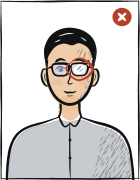
Glasses with glareGlasses with a clearly visible light reflection covering part of the eye
Hair across the faceLoose hair strands covering the eyes, eyebrows or part of the face
Eyes off-cameraEyes looking to the side instead of directly into the camera lens
Head tiltedHead tilted so the eye line is no longer horizontal
Typical rejection reasons and how to fix them
Typical reasons a photo is rejected under the rules Nigeria Immigration Service (NIS) — passport portal; Embassy of Nigeria in Washington publishes: what is wrong and what to change.
Reason
Fix
A picture that is not 600 × 800 pixels, or a file over 2 MB
Crop to 600 × 800 pixels and keep the file under 2 MB.
Glasses worn, or hair covering the face or ears
Remove the glasses and tuck the hair behind the ears.
A background that is not white or off-white, with shadows, texture or a cut-out edge
Photograph against a real plain white wall instead of removing the background.
A black-and-white photograph, over- or under-exposed, grainy or over-compressed
Use a sharp colour photograph with natural skin tones.
A smile, tilted head, eyes not open or not centred in the frame
Face the camera with a neutral expression, eyes open, the head centred and 50–69 % of the height.
The tool puts in the required background. Stand half a metre from a plain light wall, face a window and shoot without flash — then there are no shadows on your face or on the wall.
Framing
Size: 35 × 45 mm
Camera at eye level, about a metre away; head and shoulders in the shot. The tool crops it to the required size.
Glasses
Glasses prohibited
Take them off before the shot.
Expression and gaze
Neutral expression, mouth closed, eyes open
Look straight into the lens with your head level; keep hair away from your eyes and eyebrows.
Print at 100% scale, borderless, and turn off fit-to-page so each photo keeps its exact size.
Where to submit your passport application
A Nigerian passport is applied for online on the NIS passport portal (picture upload, payment, appointment), then at the chosen Immigration Office in Nigeria or at a Nigerian embassy, high commission or consulate abroad, where the photograph and biometric data are captured in person and the printed passport photographs are handed in.
NIS passport portal and Immigration Office (Nigeria)online application, then biometric enrolment in person
passport.immigration.gov.ng — choose your processing centre and booklet size (32 or 64 pages)
Processing
See the NIS service level agreement
Cost
Paid online; fee by booklet and validity
Picture upload 600 × 800 pixels, up to 2 MB, white background; two passport-sized prints endorsed at the back.
NIS passport portal, picture upload: «Image resolution should be 600x800 px. Must have white background. Hair should not cover the face or ears. Don't use any apparel-headphone, mask etc. Should have proper lighting — neither too dark, nor too bright.» «ICAO guidelines have relaxation for kids under the age of 5. Kids must look toward the camera and the face should be centered.» The file size must not exceed 2 MB.
NIS photo guidelines, composition: the image must contain the full face, neck and shoulders of the applicant in frontal view with a neutral, non-smiling expression and with the eyes open and unobstructed and directed at the camera; no extraneous objects, additional people or parts of the body below the shoulders; the photo must be recent (within 6 months). Head size: the head height, from the top of the head including the hair to the bottom of the chin, between 50 % and 69 % of the height of the image; the eye height, from the bottom of the image, between 56 % and 69 %. The head directly faces the camera, not tilted, and centred.
NIS photo guidelines, background, colour and quality: a plain, light-coloured background with no distracting shadows (the example shows white or off-white, plain without texture, objects or lines; cropping the background out with a retouching tool is unacceptable); the image in colour (24 bits per pixel), black-and-white photographs not acceptable, natural skin tones; not over- or under-exposed; the entire face in focus; no discernible pixels, graininess or dot patterns; not overly compressed (compression ratio of 20:1 or less).
NIS photo guidelines, glasses and head: «Eyeglasses are no longer allowed in Passport photo» — even when glasses are worn every day, you must remove them for the photo; no sunglasses or other items that obscure the face; hats or head coverings are only allowed if worn for religious reasons AND if they do not obscure any facial feature. Children: no other person in the photo and the child facing the camera with the eyes open; it is acceptable if an infant's eyes are not entirely open.
NIS «Passports» page: a fresh passport requires «2 passport sized photographs (passport photographs endorsed at the back by the Guarantor)» and one passport-sized photograph of the guarantor; a minor under 18 «1 passport sized photograph of minor to be endorsed on the reverse side by the consenting parent(s)»; «Applicants are required to appear at chosen Immigration Office for photograph and biometric data capturing». The application is made online and ends with the picture upload («Upload your ICAO compliant picture»), payment and an appointment for biometric enrolment.
Embassy of Nigeria in Washington, DC: for a renewal or a lost passport, «Two current passport-size photographs preferably with white background» (for a child too), a prepaid return envelope, and «Applicant to appear in person for biometric and image acquisition».
Questions
Frequently asked questions
On the NIS portal: a colour picture of 600 × 800 pixels, up to 2 MB, taken within 6 months on a white or off-white plain background, face, neck and shoulders from the front with a neutral expression and eyes open, head 50–69 % of the height, no glasses, hair off the face and ears. Paper copies are two passport-sized photographs endorsed at the back.
The upload is 600 × 800 pixels (a 3:4 portrait) and a file of 2 MB at most. The pages read describe the paper copies only as «passport sized» and give no size in millimetres.
No. The NIS photo guidelines say eyeglasses are no longer allowed in the passport photo, even if you wear them every day. Hats and head coverings are accepted only for religious reasons and only if they hide no facial feature.
White: the upload rules say «must have white background», and the photo guidelines show white or off-white, plain, without shadows, texture, objects or lines. Do not cut the background out with a retouching tool.
The ICAO rules are relaxed for children under 5: they must look toward the camera with the face centred, no other person may be in the photo, and it is acceptable if an infant's eyes are not entirely open. A minor's paper photograph is endorsed on the back by the consenting parent.
The recommended size for the Nigeria passport photo is 35 × 45 mm.
Plain white background. No gradients, textures, shadows or objects behind the subject are permitted. The tool removes background shadows automatically, but starting with a flat, evenly lit wall gives the best result.
Yes. Stand in front of a flat white wall in good natural light, face the light source and use the rear camera of your phone with a 3-second timer. The tool handles the crop, background normalisation and compliance check against the Nigeria biometric standard.
Most passport authorities require the photo to be taken within the last six months. Do not reuse an older portrait even if your appearance has not changed.
Anfas.Pro provides a 14-day full refund if the photo is rejected by the Nigeria authority and you supply the official rejection notice. See the refund policy page for the exact process.
Glasses not permitted. In practice, the biometric scanner at submission points flags even minor lens glare that looks fine to the naked eye. Removing glasses before shooting is the only option that eliminates the risk entirely.
35 × 45 mm = 3.5 × 4.5 cm = 1.38 × 1.77 inches. At 300 dpi that is 413 × 531 pixels; at 600 dpi, 827 × 1063 pixels.
Religious reasons only; must not cover the facial oval. The face must stay fully visible from chin to forehead and on both sides, with no shadow across it.