Quick answer: The recommended UK BN(O) passport photo size is 35 × 45 mm. Plain light background in cream or grey tone without patterns. Head occupies 64–76% of photo height (29–34 mm chin to crown). Neutral expression, better without glasses. Last verified .
UK BN(O) passport photo: size in mm, cm, inches and pixels
Millimetres
35 × 45 mm
Centimetres
3.5 × 4.5 cm
Inches
1.38 × 1.77″
Pixels at 300 dpi
413 × 531 px
Pixels at 600 dpi
827 × 1063 px
UK-specific things to know
Issued by HM Passport Office
Same photograph rules as the UK passport
How BN(O) passport photos are verified
UK passport photos go through two sequential checks. First, a human reviewer confirms physical dimensions, background and general composition. Second, an automated biometric face-match system compares the submitted image against the ICAO 9303 template — the international standard used in chip-based passports worldwide. The automated layer catches what human eyes often miss: head tilts below five degrees, eye-line offsets of a few pixels, and uneven shoulder positioning that throws off the centring algorithm.
The passport photo is embedded digitally into the travel document and stays bound to it for the full validity period — typically five or ten years depending on the applicant's age. A photo that barely passes at submission tends to produce poor biometric match scores during border-control checks years later, leading to secondary screening. Submission routes that print directly into the booklet require higher digital resolution than routes that scan a printed copy, because no interpolation can recover detail that was never captured.
Children may have a slightly relaxed rule on the strictly neutral expression, but eyes must remain open and the face outline unobstructed.
Digital upload routes specify a maximum file size with JPEG encoding in the sRGB colour space — see the spec table for exact values.
Examples and mistakes
What makes UK BN(O) passport photos accepted
One compliant example next to the six most common rejection causes for UK BN(O) passport applications. These are the differences that most often determine whether a document photo is accepted.
Accepted
Compliant UK BN(O) passport example (35 × 45 mm)
Face centred, looking directly into the lens
Plain background — no shadow, pattern or texture
Neutral expression, eyes open, mouth closed
No glasses, no hair across the face
Top 6 UK BN(O) passport rejection causes
Background shadowShadow on the wall behind the head, or background with a visible pattern or gradient
Smile / open mouthVisible smile with teeth or open mouth instead of a neutral expression
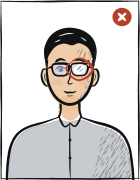
Glasses with glareGlasses with a clearly visible light reflection covering part of the eye
Hair across the faceLoose hair strands covering the eyes, eyebrows or part of the face
Eyes off-cameraEyes looking to the side instead of directly into the camera lens
Head tiltedHead tilted so the eye line is no longer horizontal
How to take your UK BN(O) passport photo correctly
Background and light
Background: cream or light grey
The tool puts in the required background. Stand half a metre from a plain light wall, face a window and shoot without flash — then there are no shadows on your face or on the wall.
Framing
Head: 64–76 % of the photo height (29–34 mm)
Camera at eye level, about a metre away; head and shoulders in the shot. The tool crops it to 35 × 45 mm.
Glasses
Better without glasses
Take them off before the shot.
Expression and gaze
Neutral expression; the applicant must be recognisable
Look straight into the lens with your head level; keep hair away from your eyes and eyebrows.
The British National (Overseas) passport is issued by HM Passport Office under the same photograph rules as the UK passport.
Questions
Frequently asked questions
The recommended size for the UK BN(O) passport photo is 35 × 45 mm. The head occupies 64–76% of the photo height. For digital upload, use 600 × 750 px.
Plain light background in cream or grey tone without patterns. No gradients, textures, shadows or objects behind the subject are permitted. The tool removes background shadows automatically, but starting with a flat, evenly lit wall gives the best result.
Yes. Stand in front of a flat, plain wall in good natural light, face the light source and use the rear camera of your phone with a 3-second timer. The tool handles the crop, background normalisation and compliance check against the UK biometric standard.
Most passport authorities require the photo to be taken within the last six months. Do not reuse an older portrait even if your appearance has not changed.
Anfas.Pro provides a 14-day full refund if the photo is rejected by the UK authority and you supply the official rejection notice. See the refund policy page for the exact process.
No reflections or tinting; remove glasses if there is a risk of reflections. In practice, the biometric scanner at submission points flags even minor lens glare that looks fine to the naked eye. Removing glasses before shooting is the only option that eliminates the risk entirely.
35 × 45 mm = 3.5 × 4.5 cm = 1.38 × 1.77 inches. At 300 dpi that is 413 × 531 pixels; at 600 dpi, 827 × 1063 pixels.
Religious or medical reasons only; must not cover the facial oval. The face must stay fully visible from chin to forehead and on both sides, with no shadow across it.
Yes. The same 35 × 45 mm format and head size apply to: driver's license, passport.