Crop a photo to 35 × 45 mm — Australia citizenship application
Upload a photo — the frame is already set for an Australia citizenship application. Ready to print or upload.
Document
No sign-up · no watermarks · your photo stays in your browser
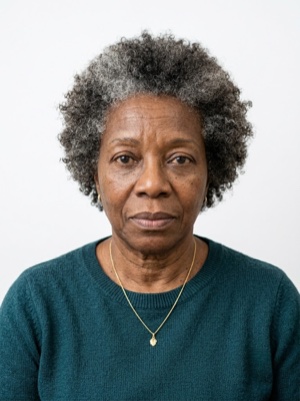
Want studio precision?AI correction fixes the light, shadows, clothing and pose — to the document's rules.€2.99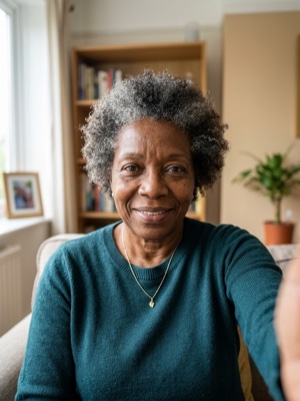
Exact numbers for this document
| Parameter | What it must be |
|---|---|
| Print size | 35 × 45 mm |
| Pixels at 300 dpi | 413 × 531 px |
| Pixels at 600 dpi | 827 × 1063 px |
| Aspect ratio | 7:9 |
| Head, share of height | 71–80% of photo height |
| Head, chin to crown | 32–36 mm chin to crown |
| Background | White or light uniform background. #ffffff |
| Glasses | Glasses prohibited, except for rare medical exceptions. |
| Head covering | Religious reasons only; must not cover the facial oval. |
How to crop it, in three steps
- 01
Upload a photo taken face-on, in even light
- 02
The tool finds the face and aligns the frame itself — check that the head lands in 71–80%
- 03
Save the 35 × 45 mm result — print it or attach it to the application
What we fix for free, and what AI fixes
Fixed for free
- Background. Replaced with the one this document asks for: white or light uniform background.
- Head tilt. Straightened if the head leans slightly to one side.
- Frame. Exactly 35 × 45 mm, by the document’s rules.
- A light shadow on one side of the face. Gently brightened.
- File and print sheet. A file to the document’s rules and a 10 × 15 or A4 sheet to print.
What can't be fixed for free, AI correction fixes
- Hard shadows and uneven light on the face.
- A smile, raised brows or a half-open mouth. Cropping keeps the face it was given.
- Too few pixels. If the original is smaller than 413 × 531 px, enlarging it only blurs the face.
- Clothing and pose. Shoulders out of frame, body turned away from the camera.
Glasses in the frame. This document does not accept them at all — take them off and shoot again.
Why these photos get rejected — and how to fix each one
Australia-specific things to know
- The background is «neutral or light grey» that contrasts with the face — not white — and the Department asks that nothing be removed or edited in the photo.
- Online and paper have different rules: a digital JPEG of 70 KB–3.5 MB (1200 × 1600 pixels preferred, never a scan or a photo of a print) against a printed passport-size photo (35–40 mm wide, 45–50 mm high) with the face 32–36 mm.
- Glasses are not allowed unless they cannot be removed for medical reasons — and vision impairment alone is not such a reason.
Printing on a single sheet
4 × 2 frames fit on one 10×15 cm sheet — 8 copies from a single print.
Print at 100% scale, borderless, and turn off fit-to-page so each photo keeps its exact size.
10 × 15 cm · 4 × 6″Photos: 8 (4 × 2)
A4 · 21 × 29.7 cmPhotos: 36 (6 × 6)
Where these numbers come from
Source: Department of Home Affairs, Australia. Last checked against the official page on 1 Oct 2026.
What the source confirms
- Home Affairs, photo quality: the photo must be no more than 6 months old; show your full face; be of good quality, in colour, taken against a neutral or light grey coloured background that contrasts with your face; be unedited (do not remove the background, moles, wrinkles, scars or red eyes); have a clear, focused image with no marks or red eye; have uniform lighting (no shadows or reflections) with appropriate brightness and contrast to show natural skin tone; have no brighter or darker areas of the face caused by lighting or exposure.
- Same page, the full-face view: the face centred and looking at the camera straight on, not tilted in any direction; hair off the face so that the edges of the face are visible; eyes open and mouth closed; a neutral expression (not smiling, laughing or frowning); no other person or object visible in the photo.
- Same page, glasses, head coverings, jewellery and infants: glasses must be removed — if you cannot remove them for medical reasons they should be untinted, the frames cannot obscure the eyes and there cannot be any reflection from the lenses, and vision impairment alone is not an acceptable reason; a religious head covering is allowed if it shows the whole face from the bottom of the chin to the top of the forehead and the edges of the face on either side (including the outer eye corner), in plain material without patterns; jewellery cannot obscure any part of the face, especially around the eyes, mouth and nose, and there can be no reflection from nose rings or studs; for infants under 3 a photo with an open mouth is acceptable, all other requirements applying.
- Same page, formats: online applications — a digital JPEG between 70 KB and 3.5 MB, preferred resolution 1200 × 1600 pixels, a scan of a photo or a photograph of a photo is not acceptable; paper applications — passport-sized, 35–40 mm wide and 45–50 mm high, the face from chin to crown a maximum of 36 mm and a minimum of 32 mm. The page recommends a professional passport photograph provider with a digital copy emailed (the Australian Post Office, or a similar provider outside Australia) and does not recommend online passport photo services and mobile apps, which may not meet the image quality requirements.
Questions people ask before cropping
What size must a citizenship application photo be in Australia?
35 × 45 mm. 71–80% of photo height.
How many pixels is 35 × 45 mm when printed?
413 × 531 px (300 dpi) · 827 × 1063 px (600 dpi).
How much of the frame should the head take?
71–80% of photo height. 32–36 mm chin to crown.
What background does this document need?
White or light uniform background.
What can’t be fixed here for free?
Hard shadows and uneven light on the face. A smile, raised brows or a half-open mouth. Cropping keeps the face it was given. Clothing and pose. Shoulders out of frame, body turned away from the camera. AI fixes this from the same photo — you see the result before paying.
How many photos fit on one 10×15 cm sheet?
4 × 2 frames fit on one 10×15 cm sheet — 8 copies from a single print.