Photo de visa américain refusée — erreurs de téléversement sur le DS-160 et comment corriger chacune
La plupart des refus de photos de visa américain surviennent à l'étape du téléversement sur le DS-160, avant même de se rendre au consulat. Le portail exécute un contrôle automatique de géométrie et de qualité, et refuse tout fichier qui ne le passe pas. Les messages d'erreur sont vagues ; ce guide associe chaque erreur à sa cause réelle.
Diagnostic rapide
Points clés à vérifier : rapport d'aspect, taille du fichier, position de la tête
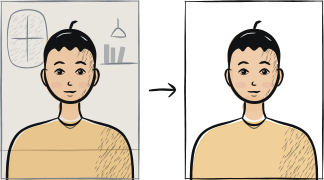
Les trois causes de refus du DS-160 les plus fréquentes sont : un fichier en orientation verticale (il doit être carré 1:1), un fichier de plus de 240 Ko et une tête non centrée (la détection automatique du DS-160 échoue avec les têtes inclinées). Les trois se règlent en 5 minutes avec le bon outil.
7 causes courantes de refus
Rapport d'aspect différent de 1:1
Le DS-160 attend une image carrée. Une photo verticale prise au téléphone est refusée automatiquement. Recadrez en 1:1 avant de la téléverser.
Fichier de plus de 240 Ko ou inférieur à 600 × 600 pixels
La limite du portail est de 240 Ko ; les dimensions minimales sont de 600 × 600 pixels. Une photo de téléphone classique pèse 3-5 Mo et doit être compressée au préalable.
Tête non centrée ou inclinée
L'algorithme de détection faciale du DS-160 exige une tête centrée horizontalement et verticalement. Une inclinaison de 5 degrés suffit à ne pas passer le contrôle.
Fond peu uniforme
Comme pour le passeport : seulement du blanc pur. Un blanc cassé, du gris ou du crème échoue. Refaites la prise de vue devant un mur lisse avec une lumière naturelle.
Lunettes visibles
Interdites depuis 2016. Retirez-les pour la prise de vue.
Photo de plus de 6 mois
Le portail ne détecte pas l'ancienneté, mais l'agent consulaire le fera au rendez-vous. Une photo manifestement ancienne (coiffure différente, lunettes retirées depuis) est refusée en personne.
Photo trop recadrée par le haut
Le sommet du crâne doit rester visible avec une petite marge. Un recadrage qui touche la naissance des cheveux ne passe pas le contrôle automatique.
Liste de récupération en 5 étapes
Utilisez l'appareil photo arrière et un trépied ou une surface stable — pas le mode selfie.
Placez-vous à 1-2 mètres d'un mur blanc lisse avec une lumière naturelle provenant d'une fenêtre.
Faites 3-5 prises avec différentes positions de tête ; choisissez la plus centrée.
Utilisez un outil qui recadre en 1:1 carré avec un minimum de 600 × 600 pixels.
Exportez en JPEG sous 240 Ko. Essayez de le téléverser avant de payer l'impression.
Questions fréquentes
01Le portail DS-160 indique que ma photo « not in the correct format », qu'est-ce qui a précisément échoué ?
Le portail ne détaille pas la cause exacte. Les fréquentes, par ordre : rapport d'aspect différent de 1:1, fichier de plus de 240 Ko, tête non centrée, fond non blanc pur. Traitez-les une par une en refaisant la prise de vue avec un outil qui applique les quatre conditions automatiquement.
02Puis-je apporter une photo imprimée à l'entretien au lieu de la téléverser ?
La plupart des consulats américains exigent le téléversement sur le DS-160 dans le cadre de la demande. La photo imprimée au rendez-vous est demandée en secours au cas où le téléversement échouerait ; vous ne pouvez pas omettre l'étape de téléversement.
03Mon ami a fait accepter la même photo sur le DS-160 le mois dernier, pourquoi la mienne échoue-t-elle ?
Le portail DS-160 met à jour ses contrôles automatiques périodiquement, sans notes de modification publiées. Une spécification qui passait le mois précédent peut échouer ce mois-ci si le contrôle a été durci. Refaites la prise de vue plutôt que de réutiliser une photo acceptée auparavant.
Autres guides de refus






Afficher les 33Réduire













Reprendre la photo en 2 minutes
Téléchargez un nouveau portrait — Anfas.Pro applique automatiquement le recadrage, l'arrière-plan et le cadrage biométrique corrects et affiche le résultat avant le paiement.