US visa photo rejected — DS-160 upload errors and how to fix each
Most US visa photo rejections happen at the DS-160 upload stage, before you even attend the consulate. The portal runs an automated geometry and quality check, and rejects any file that fails. Common error messages are vague; this guide maps each error to the actual cause.
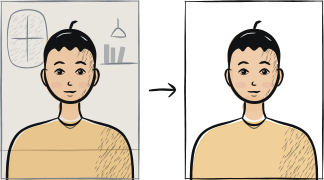
Fast diagnosis
Key checks: aspect ratio, file size, head position
The three common DS-160 rejection causes are: portrait-orientation file (must be square 1:1), file over 240 KB, and head not centred (DS-160 auto-detection fails on tilted heads). All three are fixable in 5 minutes with the right tool.
7 common rejection checks
File aspect ratio not 1:1
DS-160 expects a square image. A portrait-orientation phone photo is rejected automatically. Crop to 1:1 before upload.
File outside the DS-160 limits
The upload takes a square JPEG from 600 × 600 to 1200 × 1200 pixels, 24-bit colour, under 240 KB. Both ends matter: a full-resolution phone photo is too large in pixels and in bytes, and an over-compressed one loses the detail the reviewer needs.
Head not centred or tilted
DS-160 face detection algorithm requires the head to be centred horizontally and vertically. A 5-degree tilt is enough to fail the check.
Background not plain enough
Same as passport: plain white only. Off-white, grey, cream all fail. Reshoot against a plain wall under daylight.
Glasses visible
Banned since 2016. Remove for the shot.
Photo older than 6 months
Portal does not detect age, but the consular officer will at the appointment. A clearly older photo (different hairstyle, glasses removed since) is rejected in person.
Photo cropped too tightly at top
Crown of head must be visible with a small margin. A crop that touches the hairline fails automated check.
5-step recovery checklist
Use the rear camera and a tripod or stable surface — not selfie mode.
Stand 1-2 metres from a plain white wall under window daylight.
Take 3-5 frames with different head positions; pick the most centred.
Use a tool that crops to 1:1 square at exactly 600 × 600 pixels minimum.
Export as JPEG under 240 KB. Try the upload before paying for printing.
Frequently asked questions
01The DS-160 portal says my photo is "not in the correct format" — what specifically failed?
The portal does not list the specific failure. The common causes in order: aspect ratio not 1:1, file over 240 KB, head not centred, background not plain white. Address each in turn by reshooting through a tool that enforces all four constraints automatically.
02Can I bring a printed photo to the visa interview instead of uploading?
Check your DS-160 confirmation page: if your photo appears on it, the upload succeeded and no print is needed. If the page has no photo, the upload failed — bring one printed 2 × 2 inch photo to the interview along with the confirmation page. Some posts ask for a print regardless, so read the instructions for your embassy.
03My friend's same photo passed DS-160 last month — why does mine fail?
The specification is a set of ranges, not a single target: a square JPEG from 600 × 600 to 1200 × 1200 pixels, under 240 KB, in 24-bit colour, with the head sized as it would be on a 2 × 2 inch print. Two photos can look identical on screen and sit on opposite sides of one of those limits. Compare the actual pixel size and file weight of both files before assuming the portal changed.
Other rejection guides






Show all 33Collapse














Reshoot in 2 minutes
Upload a fresh portrait — Anfas.Pro applies the correct crop, background and biometric framing automatically and shows the result before you pay.