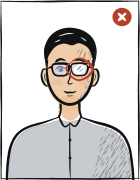
Quick answer: A USA green card photo must be 51 × 51 mm. White or off-white background. Head occupies 49–69% of photo height. Neutral expression, glasses prohibited. Last verified .
USCIS does not accept glasses, apart from rare medical cases confirmed by documents; under the 2016 rule a photo the applicant submits in glasses is rejected. See full rules →
Lighting
Shadows and reflections not permitted.
Head covering
Religious reasons only; must not cover the facial oval.
USA green card photo: size in mm, cm, inches and pixels
Millimetres
51 × 51 mm
Centimetres
5.1 × 5.1 cm
Inches
2 × 2″
Pixels at 300 dpi
602 × 602 px
Pixels at 600 dpi
1205 × 1205 px
USA-specific things to know
Square 2×2 inch (51×51mm) — same as US passport
Since Dec 12, 2025: the card photo is captured at a USCIS ASC — a photo you send in is not used on the card
Glasses not allowed without medical documentation
Religious headwear OK if face fully visible
How green card photos are verified
US Green Card (Permanent Resident Card) photos are administered by USCIS (United States Citizenship and Immigration Services). The format is 2×2 inches (51×51mm square) with head 25-35mm (1 to 1⅜ inches) chin-to-crown.
Read more
Background plain white or off-white only. The Form I-485 instructions still require two identical photographs with the application. Critical update: USCIS policy alert PA-2025-29 of 12 December 2025 states that USCIS will not use or reuse self-submitted photographs, and that Forms I-485 and I-90 always require new biometrics including a new photograph.
The portrait printed on the card is therefore taken at a USCIS Application Support Center (ASC). A photo you prepare yourself may still have to be enclosed with the filing, but it will not become the photograph on your card.
Examples and mistakes
What makes USA green card photos accepted
A photo that will be accepted, next to the six most common reasons USA green card photos get rejected.
Accepted
Compliant USA green card example (51 × 51 mm)
Face centred, looking directly into the lens
Plain background — no shadow, pattern or texture
Neutral expression, eyes open, mouth closed
No glasses, no hair across the face
Top 6 USA green card rejection causes
Background shadowShadow on the wall behind the head, or background with a visible pattern or gradient
Smile / open mouthVisible smile with teeth or open mouth instead of a neutral expression
Glasses with glareGlasses with a clearly visible light reflection covering part of the eye
Hair across the faceLoose hair strands covering the eyes, eyebrows or part of the face
Eyes off-cameraEyes looking to the side instead of directly into the camera lens
Head tiltedHead tilted so the eye line is no longer horizontal
Typical rejection reasons and how to fix them
Common reasons a document photo is rejected, checked against the requirements USCIS publishes: what is wrong and what to change.
Reason
Fix
Photo not 2×2 inch (51×51mm) square
Re-crop to USCIS spec
Head height outside 25-35mm
Re-shoot at correct distance
Background not white or off-white
Re-shoot against plain backdrop
Glasses worn (USCIS forbids except medical proof)
Remove glasses; medical exception requires documentation
Photo older than 6 months
Re-shoot
Expecting a self-submitted photo to appear on the card (not used since Dec 12, 2025)
The tool puts in the required background. Stand half a metre from a plain light wall, face a window and shoot without flash — then there are no shadows on your face or on the wall.
Framing
Head: 49–69 % of the photo height
Camera at eye level, about a metre away; head and shoulders in the shot. The tool crops it to 51 × 51 mm.
Glasses
Glasses prohibited
Take them off before the shot.
Expression and gaze
Neutral expression, eyes open
Look straight into the lens with your head level; keep hair away from your eyes and eyebrows.
Print at 100% scale, borderless, and turn off fit-to-page so each photo keeps its exact size.
Where to submit your green card application
US Green Card (Permanent Resident Card) applications are administered by USCIS (United States Citizenship and Immigration Services). Since December 12, 2025 the portrait printed on the card is captured at an Application Support Center (ASC) and a self-submitted photograph is not reused for it — while the current form instructions still require two 2×2 inch photographs in the filing package.
Form I-485 (Adjustment of Status, in-country)online + ASC visit
uscis.gov + USCIS ASC network
Processing
8-18 months (varies by category and field office)
Cost
$1,440 + ASC fee
After I-485 filing, USCIS schedules an ASC appointment for biometric capture (photo + fingerprints + signature). The portrait on the card comes from that appointment; the two 2×2 inch photographs remain required by the form instructions.
USCIS green-card filings can be form-specific; applicants must follow the current USCIS form instructions and any biometrics notice.
USCIS materials for immigration benefits use passport-style photos when an applicant-supplied photo is requested.
USCIS may also require a biometrics appointment, where fingerprints, photo and signature are collected.
The U.S. Department of State passport-style photo standard is 2 × 2 inches (51 × 51 mm).
State Department passport-photo rules require a recent colour photo and a white or off-white background.
Form I-485 instructions require two identical colour passport-style photographs, 2 by 2 inches, full face and frontal, on a white to off-white background, printed on thin glossy paper and unmounted.
The same instructions set head height at 1 to 1 3/8 inches from the top of the hair to the bottom of the chin.
From 12 December 2025 USCIS policy alert PA-2025-29 provides that USCIS will not use or reuse self-submitted photographs, and that Forms I-485 and I-90 require the collection of new biometrics, including a new photograph.
The Form I-485 instructions that ask for the two enclosed photographs have not been amended since that policy alert.
Questions
Frequently asked questions
Yes — send them. The Form I-485 instructions in force (edition 01/20/25) still list two identical 2×2 inch colour photographs among the required initial evidence. What changed on December 12, 2025 (USCIS policy alert PA-2025-29) is separate: USCIS does not use or reuse a self-submitted photograph for the card itself — the portrait printed on your Green Card is captured at an Application Support Center during the biometrics appointment. Both hold at once: the photo you file is evidence in the package, the photo on the card is taken by USCIS.
No, the DV Lottery (Diversity Visa) is administered by the State Department, not USCIS. DV entry still requires the applicant to upload a digital photo at dvprogram.state.gov: 2×2 inch square aspect ratio, JPEG ≤240 KB, 600×600 px. An automated scan rejects non-compliant photos before a human reviewer sees them.
Yes. Wear regular clothes (no uniforms, no military fatigues). Religious head coverings are allowed provided the face is fully visible from chin to forehead. Glasses must be removed unless you have documented medical justification. The ASC officer will reshoot if needed.
The USA green card photo must be 51 × 51 mm. The head must occupy 49–69% of the photo height. For digital upload, use 600 × 600 px.
Usually no older than six months; some immigration offices ask for a more recent one. Take a new photo that looks like you on the day you apply.
White or off-white background. A plain, evenly lit wall without shadows or pattern is enough — the tool sets the required background colour.
Only if the size and rules are the same and the photo is still recent. Otherwise take a new one: the same selfie can be turned into photos for both documents.
Take a new photo: it should show how you look now — hairstyle, beard, glasses.
We refund the payment in full. Email us within 14 days of purchase with your order number and the rejection notice from the USA immigration office.
51 × 51 mm = 5.1 × 5.1 cm = 2 × 2 inches. At 300 dpi that is 602 × 602 pixels; at 600 dpi, 1205 × 1205 pixels.
Religious reasons only; must not cover the facial oval. The face must stay fully visible from chin to forehead and on both sides, with no shadow across it.
Yes. The same 51 × 51 mm format and head size apply to: naturalization certificate, passport, work authorization (EAD).