New Zealand visa and NZeTA photo requirements
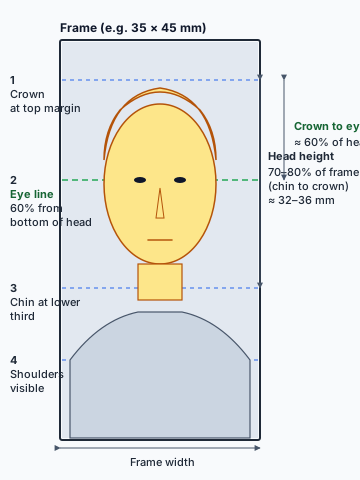
Immigration New Zealand uses one identical photo standard for a visa application and an NZeTA (New Zealand Electronic Travel Authority) application: JPG/JPEG, 512 KB to 3.14 MB, 3:4 portrait, face 70% to 80% of the frame. This page covers the size, framing and background rules and answers the most common questions.


Quick answer
JPG/JPEG, 512 KB to 3.14 MB, 3:4 portrait
A New Zealand visa or NZeTA photo is a JPG/JPEG file between 512 KB to 3.14 MB, shot at a 3:4 portrait aspect ratio, with the face covering 70% to 80% of the frame of the image. Background must be plain and neutral with no other people or objects in frame. Last reviewed .
The New Zealand visa/NZeTA photo specification
| Format | JPG or JPEG [1] |
|---|---|
| File size | 512 KB to 3.14 MB [1] |
| Aspect ratio | 3:4 portrait |
| Face size | 70% to 80% of the frame, centred in the middle of the image, looking straight at the camera with a neutral expression and mouth closed |
| Background | Neutral and plain, with no other people or objects in frame; avoid patterned clothing against a patterned backdrop |
| Glasses | Allowed if clear and not tinted, with no glare or heavy frames; sunglasses and tinted lenses are not accepted See full rules → |
| Headwear | Removed unless worn for religious or medical reasons; must not cover the mouth or the sides of the face, and hair must not hide the ears |
| Age of photo | Taken within the last 6 months, and must look like you now |
| Applies to | Visa applications and NZeTA applications alike — one shared standard [1] |
| Checked against primary sources. Updated . Sources | |
Frequently asked questions
01What size does a New Zealand visa or NZeTA photo need to be?
Immigration New Zealand asks for a JPG or JPEG file between 512 KB and 3.14 MB, taken in portrait mode with a 3:4 aspect ratio. Your face should cover 70% to 80% of the frame and sit in the middle of the image.
02Is the NZeTA photo the same as the visa photo?
Yes. Immigration New Zealand uses one identical photo standard for both a visitor/work/student visa application and an NZeTA (New Zealand Electronic Travel Authority) application. There is no separate NZeTA-only spec.
03Can I wear glasses in my New Zealand visa photo?
Yes, if the lenses are clear and not tinted, with no glare or reflection and no heavy frames covering your eyes. Sunglasses and tinted lenses are not accepted.
04Do I have to remove my headwear?
Head coverings are removed for a New Zealand visa or NZeTA photo unless you wear one for religious or medical reasons. Even then, the covering must not cover your mouth or the sides of your face, and your hair must not hide your ears unless it, too, is covered for the same reason.
05Is a New Zealand visa photo the same as a New Zealand passport photo?
No — they are two different specifications from two different agencies. Immigration New Zealand sets the visa/NZeTA spec described on this page. New Zealand Passports (the Department of Internal Affairs) sets a separate passport spec with a different file-size range and its own background rule. Check the passport-specific page if you are applying for a passport instead.
Related cross-country guides
Sources
- Immigration New Zealand, Acceptable photos for a visa or NZeTA — official photo specification. immigration.govt.nz ↗
Verified . We monitor immigration.govt.nz for changes to this specification.
Get the background, framing and lighting right on the first try
Take the photo with someone else holding the camera — ideally at eye level — and use our free step-by-step guide to get the background, framing and lighting right on the first try.