How to resize a photo to the exact passport, visa or ID size
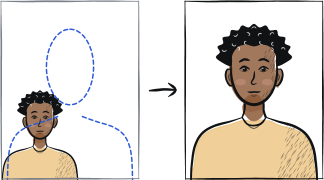
Resizing a photo to a passport size is not just cropping. The photo has to match the exact target dimensions (e.g. 35 × 45 mm), at a high enough DPI to print sharply (typically 600 dpi), with the head occupying the percentage of the frame your own country publishes.
In this article · 4 sections
Quick answer
Match the country size, DPI 600+, country head ratio
Identify the target country size (35 × 45 mm for Schengen, 2 × 2 inches for USA, 45 × 35 mm for an India passport). Set the DPI to 600 minimum. Crop to the head ratio your country publishes — roughly 70-80% of frame height for Schengen, 50-69% for USA. Upload size caps differ from portal to portal.
Step-by-step
Identify the target country size
Schengen visa: 35 × 45 mm. USA passport/visa: 2 × 2 inches (51 × 51 mm). UK passport: 45 × 35 mm. India passport: 45 × 35 mm (4.5 × 3.5 cm) on a white background — and only when you apply somewhere other than a Passport Seva Kendra, which photographs you at the counter. China passport: 33 × 48 mm. See our country-by-country guide for the rest.
Convert mm to pixels at 600 dpi
For 35 × 45 mm at 600 dpi: 827 × 1063 pixels. For 2 × 2 inches at 600 dpi: 1200 × 1200 pixels. A 45 × 35 mm photo is the same rectangle written height-first, so it is also 827 × 1063 pixels. Lower DPI (300) is acceptable for some portals but produces a softer print.
Crop the head to the right ratio
The head-to-frame ratio is set by the country, not by a global rule: roughly 70-80% for Schengen, 50-69% for USA. In millimetres, chin-to-crown runs about 32-36 mm for Schengen, 29-34 mm for the UK and 25-35 mm for USA. Take the number from the page for your own country.
Check the background is uniform
After cropping, the corners of the photo must read as the same colour. Use a tool like our background-check function to verify before printing.
Export at the correct file size
Limits vary a lot between portals: the UK asks for at least 50 KB and no more than 10 MB, while some others cap at a few hundred KB. A high-quality export at 600 dpi is typically 800 KB to 2 MB; compress with quality 85-90 to fit the portal limit.
Test the file size and dimensions before uploading
Open the file properties on your computer to confirm dimensions match the country specification exactly. Some portals reject files that are within 1 mm of the spec but not exact.
Frequently asked questions
01What is the difference between size in millimetres and size in pixels?
Millimetres are the physical print size. Pixels are the digital file dimension. They are linked by DPI: 35 × 45 mm at 600 dpi = 827 × 1063 pixels. National portals usually specify both — the millimetre size for the printed copy and the pixel size for the digital upload.
02Why does my photo look pixelated after resizing?
You probably resized up rather than down. A photo originally at 600 × 800 pixels cannot be made larger without becoming pixelated. Start from a higher-resolution source (phone camera at maximum quality is 3000+ pixels) and resize down.
03Can I use Adobe Photoshop, GIMP or Pixlr for this?
Yes — any image editor with a resize-to-pixel-dimensions option works. Photoshop's "Image Size" dialog lets you set both pixel and physical dimensions. The Anfas.Pro tool handles this automatically against country-specific profiles.
Related guides
Skip the manual steps
Upload a portrait — Anfas.Pro applies the country-specific crop, background and biometric framing automatically. Free preview before payment.