SourceUnique Identification Authority of India (UIDAI)
Verified
Quick answer: The recommended India Aadhaar card photo size is 35 × 45 mm. Plain light background without textures, shadows, or foreign objects. Head occupies 70–80% of photo height. Neutral expression, glasses prohibited. Last verified .
India Aadhaar card photo: size in mm, cm, inches and pixels
Millimetres
35 × 45 mm
Centimetres
3.5 × 4.5 cm
Inches
1.38 × 1.77″
Pixels at 300 dpi
413 × 531 px
Pixels at 600 dpi
827 × 1063 px
India-specific things to know
Aadhaar is the exception among Indian documents: there is no photograph for the resident to prepare — UIDAI publishes no size, background or file rule, because the centre captures the photograph together with the fingerprints and iris scans.
The photograph cannot be updated online or by post, only in person at a permanent enrolment centre, and the Aadhaar update clients (Update Client Lite) require biometric authentication of the resident.
A biometric update that includes the photo is free in two age windows (5–7 and 15–17) and costs ₹125 otherwise, according to UIDAI's charges document.
How Aadhaar card photos are verified
There is no photo size for Aadhaar because you do not supply the photograph: UIDAI lists the biometric information taken at enrolment as «ten fingerprints, two iris scans and a facial photograph» — the operator at the enrolment centre captures it live. The same goes for changing it: the photograph can be updated, but only in person — UIDAI's FAQ answers «Is there any method of updating Biometrics online or by post?» with «No, for all Biometric updates including photograph you have to personally visit the nearest Aadhaar Permanent Enrolment centre», and the self-service online mode offers only the address update.
Read more
At the centre the operator uses the Update Client Lite, where all demographic fields and the photo can be updated after biometric authentication of the resident, and you receive an acknowledgement receipt with an Update Request Number (URN) to track the request. UIDAI's charges document says a biometric update (fingerprint, iris and photo) is free when done for the first time between the ages of 5 and 7, or the first or second time between 15 and 17, and ₹125 otherwise (with a free window for ages 7 to 15 that the document dated «till 30.9.2026»); a demographic update done at the same time is free.
So the practical point is the reverse of other documents: there is no photo to bring. If you need a photo for a related document (passport, PAN, driving licence), those pages have their own specifications.
Examples and mistakes
What makes India Aadhaar card photos accepted
A photo that will be accepted, next to the six most common reasons India Aadhaar card photos get rejected.
Accepted
Compliant India Aadhaar card example (35 × 45 mm)
Face centred, looking directly into the lens
Plain background — no shadow, pattern or texture
Neutral expression, eyes open, mouth closed
No glasses, no hair across the face
Top 6 India Aadhaar card rejection causes
Background shadowShadow on the wall behind the head, or background with a visible pattern or gradient
Smile / open mouthVisible smile with teeth or open mouth instead of a neutral expression
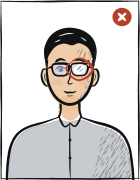
Glasses with glareGlasses with a clearly visible light reflection covering part of the eye
Hair across the faceLoose hair strands covering the eyes, eyebrows or part of the face
Eyes off-cameraEyes looking to the side instead of directly into the camera lens
Head tiltedHead tilted so the eye line is no longer horizontal
Typical rejection reasons and how to fix them
Typical reasons a photo is rejected under the rules Unique Identification Authority of India (UIDAI) publishes: what is wrong and what to change.
Reason
Fix
Trying to update the Aadhaar photograph online or by post
Visit a permanent enrolment centre in person — UIDAI accepts photograph updates only there.
A photograph update without the biometric authentication of the resident
Attend in person: the update client authenticates the resident biometrically.
A mandatory biometric update bundled with another transaction
Do the mandatory biometric update as a stand-alone transaction.
Bringing or uploading your own photo, as with a passport or PAN
There is no upload: the centre captures the photograph live.
How to take your India Aadhaar card photo correctly
Background and light
Background: plain light
The tool puts in the required background. Stand half a metre from a plain light wall, face a window and shoot without flash — then there are no shadows on your face or on the wall.
Framing
Head: 70–80 % of the photo height
Camera at eye level, about a metre away; head and shoulders in the shot. The tool crops it to 35 × 45 mm.
Glasses
Glasses prohibited
Take them off before the shot.
Expression and gaze
Neutral expression, mouth closed, eyes open
Look straight into the lens with your head level; keep hair away from your eyes and eyebrows.
Print at 100% scale, borderless, and turn off fit-to-page so each photo keeps its exact size.
Where to submit your Aadhaar card application
Aadhaar enrolment and photograph updates are done in person at a permanent Aadhaar enrolment centre or Aadhaar Seva Kendra; no photograph is brought, as the operator captures it with the fingerprints and iris scans.
Permanent Aadhaar enrolment centre or Aadhaar Seva Kendrain person; photograph updates are not possible online or by post
uidai.gov.in — locate an enrolment centre and book an appointment
Processing
See UIDAI; an acknowledgement with an Update Request Number is issued
Cost
Free in the age windows 5–7 and 15–17, otherwise ₹125 for a biometric update
UIDAI, About Aadhaar: the biometric information taken at enrolment is ten fingerprints, two iris scans and a facial photograph; the demographic information is name, address, date of birth, gender, mobile number and email address.
UIDAI, Updating data on Aadhaar: the information that can be updated includes the biometric information — iris, finger prints and facial photograph; the self-service online mode offers address update to the residents; at an Enrolment / Update Centre the Update Client Lite can update all demographic fields and the photo as well as the local language, with identity authentication by biometric authentication of the resident, and the resident gets an acknowledgement receipt with an Update Request Number (URN) which can be tracked.
UIDAI FAQ: «Can I update Biometrics (Finger Prints/ Iris/photograph) in Aadhaar?» — Yes; for biometric updates you need to visit the nearest Permanent Enrolment centre. «Is there any method of updating Biometrics online or by post?» — No; for all biometric updates including the photograph you have to personally visit the nearest Aadhaar Permanent Enrolment centre. You can visit any permanent enrolment centre for an update, not only the one where you enrolled.
UIDAI, Free Aadhaar update charges: biometric update (fingerprint, iris and photo) — free if done for the first time between the ages of 5 and 7, free if done the first or second time between the ages of 15 and 17, otherwise ₹125 (free between the ages of 7 and 15 till 30.9.2026); a demographic update done at the same time as a biometric update is free; a Mandatory Biometric Update is a stand-alone transaction and may not be clubbed with any other transaction.
Questions
Frequently asked questions
UIDAI publishes none for the resident: the facial photograph is captured live at the enrolment centre together with ten fingerprints and two iris scans, so you do not bring a photo.
No: UIDAI says that for all biometric updates including the photograph you have to personally visit the nearest permanent Aadhaar enrolment centre; the online self-service mode offers only the address update.
There is no published size, because you do not upload a photograph — the operator captures it. Passport, PAN or driving-licence photos have their own sizes.
According to UIDAI's charges document a biometric update (fingerprint, iris and photo) is free when done for the first time between the ages of 5 and 7 or the first or second time between 15 and 17, and ₹125 otherwise; a demographic update done at the same time is free.
The recommended size for the India Aadhaar card photo is 35 × 45 mm. The head occupies 70–80% of the photo height. The photo should look like you do day to day.
Plain light background without textures, shadows, or foreign objects. A plain, evenly lit wall without shadows or pattern is enough — the tool sets the required background colour.
Most offices accept a photo taken within the last six months. If your hair, beard or face has changed noticeably since then, take a new one.
Glasses not permitted.
We refund the payment in full. Email us within 14 days of purchase with your order number and the rejection notice from the India authority.
35 × 45 mm = 3.5 × 4.5 cm = 1.38 × 1.77 inches. At 300 dpi that is 413 × 531 pixels; at 600 dpi, 827 × 1063 pixels.