Quick answer: The recommended Australia visa photo size is 35 × 45 mm. White or light uniform background. Head occupies 71–80% of photo height (32–36 mm chin to crown). Neutral expression, glasses prohibited. Last verified .
Australia visa photo: size in mm, cm, inches and pixels
Millimetres
35 × 45 mm
Centimetres
3.5 × 4.5 cm
Inches
1.38 × 1.77″
Pixels at 300 dpi
413 × 531 px
Pixels at 600 dpi
827 × 1063 px
Australia-specific things to know
The background wording differs from the passport: Home Affairs asks for a neutral or light grey background that contrasts with the face, not for white.
The upload is a file, not a print: JPEG, 70 KB–3.5 MB, preferably 1200 × 1600 px (a 3:4 portrait). A scan of a photo or a photograph of a photo is rejected.
The photo must be unedited: Home Affairs says not to remove the background, moles, wrinkles, scars or red eyes.
Every applicant, children included, has a Photograph section under their own name in the form; check that the file attached belongs to the person named there.
How visa photos are verified
Photographs for Australian visas are set by the Department of Home Affairs. In ImmiAccount the application asks for a digital photograph of every applicant, children included: a JPEG between 70 KB and 3.5 MB (preferred resolution 1200 × 1600 pixels), taken within the last 6 months, a full-face view of head and shoulders, good quality, in colour, against a neutral or light grey background that contrasts with the face, and unedited — nothing removed, not the background, moles, wrinkles, scars or red eyes.
Read more
Only a digital copy may be uploaded: a scan of a photo or a photograph of a photo is not acceptable. Forms that ask for a printed photo use a different line: a recent passport photograph of 45 × 35 mm, head and shoulders only, facing the camera on a plain background, under six months old, with the person's name printed on the back.
This differs from the Australian Passport Office's rules for passports.
Examples and mistakes
What makes Australia visa photos accepted
One compliant example next to the six most common rejection causes for Australia visa applications. These are the differences that most often determine whether a document photo is accepted.
Accepted
Compliant Australia visa example (35 × 45 mm)
Face centred, looking directly into the lens
Plain background — no shadow, pattern or texture
Neutral expression, eyes open, mouth closed
No glasses, no hair across the face
Top 6 Australia visa rejection causes
Background shadowShadow on the wall behind the head, or background with a visible pattern or gradient
Smile / open mouthVisible smile with teeth or open mouth instead of a neutral expression
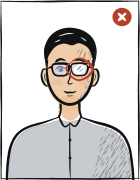
Glasses with glareGlasses with a clearly visible light reflection covering part of the eye
Hair across the faceLoose hair strands covering the eyes, eyebrows or part of the face
Eyes off-cameraEyes looking to the side instead of directly into the camera lens
Head tiltedHead tilted so the eye line is no longer horizontal
Typical rejection reasons and how to fix them
Typical reasons a photo is rejected under the rules Department of Home Affairs (Australia) publishes: what is wrong and what to change.
Reason
Fix
File outside the limits: not a JPEG, under 70 KB or over 3.5 MB
Save the photo as a JPEG between 70 KB and 3.5 MB, preferably 1200 × 1600 pixels in portrait orientation.
A scan of a photo or a photograph of a photo
Upload the original digital file, for example the copy emailed by a photo provider, not a picture of a print.
Background not neutral or light grey, or without contrast against the face
Use a neutral or light grey background that stands out from your face; avoid backgrounds as dark as your hair or as pale as your skin.
Edited photo: background, moles, wrinkles, scars or red eyes removed
Upload an unretouched photo; fix the background by shooting against a real neutral wall, not by cutting it out afterwards.
Photo older than 6 months
Take a new photo within the 6 months before you submit; both the digital and the paper Home Affairs pages use that limit.
Tinted or reflecting glasses, frames over the eyes, or a patterned head covering
Take the glasses off if you can; otherwise untinted lenses, frames clear of the eyes and no reflection. A religious head covering must be plain and leave the whole face visible.
The tool puts in the required background. Stand half a metre from a plain light wall, face a window and shoot without flash — then there are no shadows on your face or on the wall.
Framing
Head: 71–80 % of the photo height (32–36 mm)
Camera at eye level, about a metre away; head and shoulders in the shot. The tool crops it to 35 × 45 mm.
Glasses
Glasses prohibited
Take them off before the shot.
Expression and gaze
Neutral expression, mouth closed, eyes open
Look straight into the lens with your head level; keep hair away from your eyes and eyebrows.
Print at 100% scale, borderless, and turn off fit-to-page so each photo keeps its exact size.
Where to submit your visa application
Most Australian visa applications are lodged online in ImmiAccount, where the photograph is uploaded as a digital file for each applicant. Some forms still ask for a printed passport-style photo with the person's name on the back.
ImmiAccount (online application)online
Department of Home Affairs — the Photograph section under each applicant's name
Processing
Depends on the visa subclass; shown in ImmiAccount and on the visa page
Cost
Visa application charge of the subclass
Digital JPEG of 70 KB–3.5 MB (preferred 1200 × 1600 px), under 6 months old, neutral or light grey background, unedited; a scan of a photo is not acceptable. Select «Confirm» after adding the photo.
Paper forms that ask for «Photograph - Passport»mail / in-person
As the form and the visa page instruct
Processing
Depends on the visa subclass
Cost
Visa application charge of the subclass
A recent 45 × 35 mm passport photo, head and shoulders only, facing the camera on a plain background, under six months old; print the person's name on the back.
Home Affairs, digital photograph for a visa application: JPEG between 70 KB and 3.5 MB, preferred resolution 1200 × 1600 pixels; a digital photograph for each applicant, including children.
Same page: no more than 6 months old; a full-face view of head and shoulders; good quality, in colour, against a neutral or light grey background that contrasts with the face; unedited (background, moles, wrinkles, scars or red eyes must not be removed).
Same page: glasses should be removed unless they cannot be for medical reasons; if worn they must be untinted with frames not obscuring the eyes and no reflection from the lenses. A religious head covering is allowed if the whole face is visible and the covering is plain material without patterns.
Home Affairs recommends a professional passport photo provider, such as an Australia Post office (or a similar one outside Australia), where a digital copy can be emailed to you. Only a digital copy may be uploaded — a scan of a photo or a photograph of a photo is not acceptable.
Home Affairs, «Photograph - Passport» (paper evidence): a recent passport photograph of 45 mm × 35 mm, head and shoulders only, facing the camera, against a plain background, less than six months old, with the name of the person printed on the back.
Questions
Frequently asked questions
For an online application, a digital JPEG between 70 KB and 3.5 MB (preferred 1200 × 1600 pixels), taken within the last 6 months, showing a full-face view of head and shoulders, in good quality and colour, against a neutral or light grey background that contrasts with the face, and unedited. Glasses off unless a medical reason prevents it; a plain religious head covering is allowed if the whole face shows.
It depends on how the photo is submitted. Online in ImmiAccount the photo is a JPEG file of 70 KB–3.5 MB with a preferred resolution of 1200 × 1600 pixels. On forms that ask for a paper photo, Home Affairs gives a passport photograph of 45 mm × 35 mm (35 × 45 mm wide × high), with the name printed on the back. The 35 × 45 mm Passport Office size is a passport rule, not the visa one.
No. Home Affairs says to upload only a digital copy of the photograph: a scan of a photo or a photograph of a photo is not acceptable. Use the original digital file, for example the copy a photo provider emails you, as long as it meets the JPEG size limits and is unedited.
A neutral or light grey background that contrasts with the applicant's face — that is the wording on the Home Affairs photograph page. A plain light wall works; avoid anything patterned, and do not remove or lighten the background in an editor, because the photo must be unedited. Paper forms say a plain background.
The recommended size for the Australia visa photo is 35 × 45 mm. The head occupies 71–80% of the photo height. Many consulates also require a specific digital file size — see the spec table above for full details.
White or light uniform background. The background must be evenly lit with no shadow gradients, especially around the head. Consular automated pre-screening rejects photos with any wall texture before the human reviewer ever sees the application.
Visa authorities typically require the photo to be taken within the last three to six months. Submitting an older photo, even one that looks similar to your current appearance, is a frequent cause of immediate consular rejection.
Not always. Tourist, work, student and transit visa categories sometimes specify different dimensions or background rules. Follow the requirements for your specific visa type rather than assuming one photo fits all Australia visa applications.
Anfas.Pro provides a 14-day full refund if the photo is the cause of rejection and you supply the consular rejection notice. We recommend keeping the consular receipt with rejection reason as proof.
Glasses prohibited, except for rare medical exceptions. Consular automated checks flag glasses glare even when it is invisible to the human eye. Removing glasses entirely is the safest choice unless a medical exception is documented in your visa application.
35 × 45 mm = 3.5 × 4.5 cm = 1.38 × 1.77 inches. At 300 dpi that is 413 × 531 pixels; at 600 dpi, 827 × 1063 pixels.
Religious reasons only; must not cover the facial oval. The face must stay fully visible from chin to forehead and on both sides, with no shadow across it.
Yes. The same 35 × 45 mm format and head size apply to: citizenship application, passport, refugee travel document.