Schengen visa photo rejected — reasons and how to fix each
A Schengen visa photo can be rejected at the appointment even when it was accepted by the online portal. The desk officer checks the printed copy against the digital file under daylight — and that is where most rejections happen.
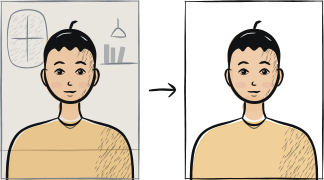
Fast diagnosis
Key checks: background colour, eye visibility, head ratio
The Schengen print is 35 mm wide by 45 mm high, and the head must fill 70-80% of that height. The three common rejection causes at Schengen consulates are: background that reads as off-white when printed, eyes partially covered by hair or glasses glare, and head height outside that 70-80% ratio. Fix these three before reshooting.
7 common rejection checks
Background not plain enough
A wall that looks plain on screen often prints as cream, grey or shadowed. Reshoot at least 1 metre from a blank white wall under daylight from a window in front of you.
Eye region not clearly visible
Hair across the eye, glasses glare or squinting will fail the biometric check. Pull hair back, remove glasses, retake under softer light.
Head height outside 70-80% of frame
Either too small (head looks lost in a wide crop) or too big (forehead cropped). Use the tool to fit the head ratio automatically rather than cropping manually.
Shadow behind the head
Stand at least 1 metre away from the wall so your own shadow does not fall on it. Diffuse daylight is better than indoor lighting for this.
Expression too neutral or smiling
A faint smile is rejected at most Schengen consulates. Mouth closed, jaw relaxed, eyes open and looking at the lens.
Photo older than 6 months
Schengen requires a photo "taken in the last 6 months". A clearly older photo is rejected even if the subject looks the same. Take a fresh shot.
Print on regular paper instead of photo paper
The EU photograph guidelines ask for a clean print with no ink marks, creases or fold lines. Plain office paper shows all three. Print on photo paper, or use a professional photo printer.
5-step recovery checklist
Find the cause first: background, shadow and glasses glare need a new shot; head size and crop can be fixed on the photo you already have.
Move 1-2 metres from a plain light wall. Face a window during daylight.
Remove glasses. Pull hair away from the eyes and forehead.
Use the rear camera, eye level, short timer, neutral expression, mouth closed.
Upload the new shot through our tool — it will check geometry and background before you pay.
Frequently asked questions
01Can I appeal a Schengen visa photo rejection?
Reshooting is faster than appealing. Appeal only if the rest of the file was correct and the rejection note specifies an error unrelated to the photo.
02Will my visa fee be refunded if the photo is rejected?
No. The €90 visa fee is non-refundable in all Schengen states. The fee covers application processing whether granted or refused. Re-applying with a correct photo costs a fresh €90. Children aged six to under twelve pay €45 and children under six pay nothing, but those fees are equally non-refundable, and applying through a visa service centre adds a separate service charge on top.
03How long do I have to reshoot before the appointment expires?
It depends on the consulate and the visa centre, not on a Schengen-wide rule. Many centres have a photo booth on site and will let you use it during the same visit; others require a new appointment. The rebooking policy of the specific centre — not the photo — decides whether you lose the slot.
Other rejection guides





Show all 33Collapse














Reshoot in 2 minutes
Upload a fresh portrait — Anfas.Pro applies the correct crop, background and biometric framing automatically and shows the result before you pay.