UK passport photo rejected — HMPO reasons and how to fix each
HM Passport Office (HMPO) publishes a detailed photo standard, and the GOV.UK passport service checks your upload against it before a human ever sees it. First attempts usually fail on the same few points: the background, the size of the head in the frame, a shadow — or a photo that is simply too old, because HMPO asks for one taken in the last month. This guide covers the seven common rejection causes and how to fix each.
Fast diagnosis
Key checks: photo age, shadows, background
The three details that catch most applicants are: a photo taken more than a month before the application, shadows on the face from indoor lighting, and a background that is not plain enough. All three are fixed by taking a fresh shot under window daylight against a blank light-coloured wall.
7 common rejection checks
Photo older than one month
HMPO asks for a photo taken in the last month — far stricter than the six-month rule used by Schengen states, the US and Canada. A photo left over from an earlier application is refused on age alone, even if nothing about your appearance has changed.
Shadow on face
Indoor lighting from above creates eye-socket shadows; ceiling lights are the worst. Face a window during daylight instead.
Head tilted or rotated
HMPO's check rejects any visible tilt. Use a tripod and check the eye-line is horizontal before shooting.
Background not plain
HMPO accepts any plain light colour — white, cream, ivory, vanilla or light grey. What fails is texture, pattern, an object in the frame, or a shadow, and your face has to be in clear contrast to whatever is behind you.
Eyes not fully visible
Hair across the eye, glasses glare, squinting under strong light. Reshoot under softer light with hair pulled back.
Expression not plain
GOV.UK asks for a plain expression with the mouth closed. Even a closed-lip smile changes the shape of the eyes and cheeks, so keep the jaw relaxed and the mouth shut.
Wrong head size in frame
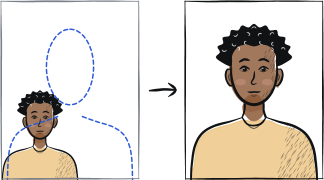
Crown of head to chin must be 29-34 mm in the 35 × 45 mm frame. Use a tool that fits this automatically.
5-step recovery checklist
Stand about 50 cm in front of a plain light-coloured wall; whoever takes the photo stands roughly 1.5 m from you.
Face a window during daylight. Avoid any artificial light source.
Use a tripod or stable surface at eye level. Set a 3-second timer.
Mouth closed, eyes open and looking at the lens, head straight.
Choose your route first: for the online service upload the uncropped frame (head, shoulders and upper body, at least 600 × 750 px, 50 KB – 5 MB) and let HMPO crop it; for a paper application print two identical 35 × 45 mm copies.
Frequently asked questions
01How many times can I re-upload to HMPO?
The GOV.UK passport service allows multiple uploads per application. Each upload runs the same automated check, and there is no penalty for trying again — so it is worth fixing one fault at a time (background first, then head size, then lighting) rather than reshooting everything blindly.
02Can I use my Schengen visa photo for a UK passport?
The print is the same size — 35 mm wide by 45 mm high — so the difference is not the paper. HMPO measures the head from chin to crown and wants 29 to 34 mm, and it asks for a photo taken in the last month, while Schengen allows six months and states the face should fill 70 to 80 per cent of the frame. A Schengen photo usually fails on the head measurement, the age, or both.
03Why was my photo rejected but my friend's nearly identical photo accepted?
HMPO's automated check measures dozens of parameters; tiny differences (1 mm head height, 1-degree tilt, slightly different background shade) can be the difference between pass and fail. Reshoot rather than try to match the friend's photo.
Other rejection guides





Show all 33Collapse









Reshoot in 2 minutes
Upload a fresh portrait — Anfas.Pro applies the correct crop, background and biometric framing automatically and shows the result before you pay.