Australia visa photo rejected — Home Affairs reasons and how to fix each
Australian visa photo rules are published as ranges rather than single numbers, which is exactly what catches applicants out. For a paper application Home Affairs accepts a print between 35 and 40 mm wide and 45 and 50 mm high; for a digital file it asks for a JPEG between 70 KB and 3.5 MB, with 1200 × 1600 pixels as the preferred resolution. This guide covers the six common rejection causes.
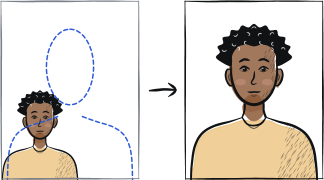
Fast diagnosis
Key checks: file outside the range, head not centred, background shadow
The three common Home Affairs rejection causes are: a file outside the 70 KB – 3.5 MB range, a head that is not centred in the frame, and a shadow on the background from indoor lighting. All three are fixed by retaking with the rear camera at full resolution against a plain, neutral or light grey wall under window daylight.
6 common rejection checks
File outside the accepted range
Home Affairs asks for a JPEG between 70 KB and 3.5 MB, with 1200 × 1600 pixels as the preferred resolution. Phone photos sent through WhatsApp or Messenger are compressed in transit and drop below the floor; a photo of a photo, or a scan of a print, is not accepted at all.
Head not centred in frame
ImmiAccount automated check requires the head centred within tight tolerances. A head shifted left or right by even a few mm fails.
Background shadow, or a background that does not contrast
Home Affairs asks for a neutral or light grey background that contrasts with your face. A shadow on the wall behind the head is the top desk-rejection cause — stand at least 1 metre from the wall and face a window.
Glasses visible
Discouraged at most VACs because of glare risk. Remove for the shot.
Smile detected
Home Affairs prefers fully neutral. A closed-lip smile sometimes passes; safer to keep mouth closed.
Print outside the accepted size range
For a paper application Home Affairs accepts a print 35 to 40 mm wide and 45 to 50 mm high — a range, not a single size. The tighter chin-to-crown rule you may have read about belongs to the Australian passport, which is a separate specification.
5-step recovery checklist
Use the rear camera at maximum resolution (12 MP or higher).
Send the file via AirDrop / direct USB / Google Drive — not WhatsApp or messaging apps.
Stand 1-2 metres from a plain wall under window daylight.
Take 5-10 frames, pick the most centred.
Use a tool that fits the print inside the 35-40 mm × 45-50 mm range and exports a JPEG of 70 KB to 3.5 MB.
Frequently asked questions
01Why does Home Affairs ask for such a large file?
Not for printing — Australian visas have carried no label since September 2015 and exist only as an electronic record checked through VEVO. The resolution exists so the image survives facial-recognition matching at the border and in the departmental record, which is why a screenshot or a photo of a photo is rejected outright.
02Can I use a photo taken with the front camera?
No. The front (selfie) camera uses a wide-angle lens that distorts head proportions. The Home Affairs biometric check rejects photos with selfie-camera distortion.
03My photo passed ImmiAccount but the VAC rejected it — why?
The VAC takes a fresh biometric photo at the appointment. If your uploaded photo passes the ImmiAccount check but the VAC officer is concerned about quality, they may re-capture in person. The fresh capture is binding; the uploaded version is supplementary.
Other rejection guides





Show all 33Collapse














Reshoot in 2 minutes
Upload a fresh portrait — Anfas.Pro applies the correct crop, background and biometric framing automatically and shows the result before you pay.