Fotografia de visto da Austrália recusada — motivos do Home Affairs e como corrigir cada um
Os pedidos de visto australiano usam o formato biométrico padrão 35 × 45 mm — o mesmo que o Schengen, o UK e a maioria dos países da Commonwealth. A causa de recusa mais frequente não é o tamanho, mas a qualidade da imagem: o Home Affairs exige um ficheiro digital de pelo menos 900 × 1200 pixels, um valor superior ao da maioria dos portais nacionais.
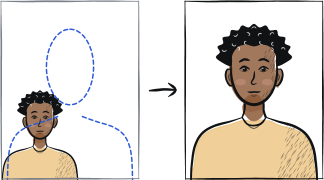
Diagnóstico rápido
Verificações essenciais: resolução baixa, cabeça não centrada, sombra no fundo
As três causas de recusa frequentes do Home Affairs são: fotografia abaixo do mínimo de 900 × 1200 pixels, cabeça não centrada horizontalmente no enquadramento de 35 × 45 mm, e sombra no fundo devida à iluminação interior. As três resolvem-se repetindo a captura com a câmara traseira à resolução máxima, frente a uma parede lisa com luz natural proveniente de uma janela.
7 causas comuns de recusa
Resolução digital baixa
O Home Affairs exige um mínimo de 900 × 1200 pixels. As fotografias de telemóvel enviadas por WhatsApp ou Messenger ficam abaixo — são comprimidas durante a transferência.
Cabeça não centrada no enquadramento
A verificação automática do ImmiAccount exige uma cabeça centrada com tolerâncias estreitas. Um desvio de alguns milímetros para a esquerda ou para a direita não é admitido.
Sombra no fundo
A sombra na parede atrás da cabeça é a principal causa de recusa ao balcão. Coloque-se a pelo menos 1 metro da parede e vire-se para uma janela.
Óculos visíveis
Desaconselhados na maioria dos VAC pelo risco de reflexos. Retire-os para a captura.
Sorriso detetado
O Home Affairs prefere uma expressão totalmente neutra. Um sorriso de lábios fechados por vezes passa; é mais seguro manter a boca fechada.
Proporção de cabeça incorreta
Do queixo ao topo da cabeça devem ser 32-36 mm no enquadramento 35 × 45 mm. Demasiado pequena não passa; demasiado grande corta o topo da cabeça.
Fotografia proveniente de uma captura de ecrã
Uma captura de ecrã de uma fotografia no ecrã do telemóvel produz padrões de moiré que as verificações automáticas detetam.
Lista de recuperação em 5 passos
Use a câmara traseira na resolução máxima (12 MP ou superior).
Envie o ficheiro por AirDrop / USB direto / Google Drive — não por WhatsApp nem aplicações de mensagens.
Coloque-se a 1-2 metros de uma parede lisa com luz natural proveniente de uma janela.
Faça 5-10 disparos e escolha o mais centrado.
Use uma ferramenta que recorte para 35 × 45 mm com a proporção de cabeça ajustada automaticamente.
Perguntas frequentes
01Porque é que o Home Affairs precisa de uma resolução tão alta?
O mínimo de 900 × 1200 pixels permite imprimir a fotografia ao tamanho completo de 35 × 45 mm a 600+ DPI para a vinheta do visto. As fotografias de menor resolução imprimem-se mais esbatidas e podem não passar nos controlos de reconhecimento facial na fronteira.
02Posso usar uma fotografia tirada com a câmara frontal?
Não. A câmara frontal (selfie) usa uma objetiva grande angular que distorce as proporções da cabeça. A verificação biométrica do Home Affairs recusa fotografias com distorção de câmara frontal.
03A minha fotografia passou no ImmiAccount, mas o VAC recusou-a, porquê?
O VAC tira uma fotografia biométrica nova na entrevista. Se a sua fotografia carregada passa o controlo do ImmiAccount, mas o funcionário do VAC tem dúvidas quanto à qualidade, pode voltar a captá-la presencialmente. A captura nova é vinculativa; o carregamento é complementar.
Outros guias de recusa





Mostrar todos os 33Recolher
















Repetir a fotografia em 2 minutos
Carregue um novo retrato — a Anfas.Pro aplica automaticamente o recorte, o fundo e o enquadramento biométrico corretos e mostra o resultado antes de pagar.