Mexico passport photo rejected — SRE reasons and how to fix each
Mexico's Secretaría de Relaciones Exteriores (SRE) publishes exact photo examples for passport applicants: 45 × 35 mm, plain white background, taken within the last 30 days. Consulates abroad may reject photos that miss any one of these points, even when the sitter looks perfectly fine in the picture.
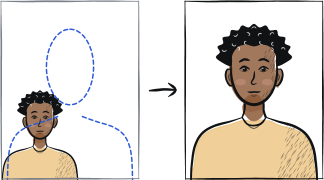
Fast diagnosis
Key checks: wrong size, background tint, photo too old
Common checks include a photo printed at a size other than 45 × 35 mm, a background that is grey, shadowed or marked instead of plain white, and a photo older than the 30-day window SRE enforces — the strictest recency rule among the major passport authorities. SRE asks for two identical prints, not one.
7 common rejection checks
Photo older than 30 days
SRE's own printed instructions state the photo must be "no mayor a 30 días de anterioridad" — not older than 30 days. This is stricter than the 6-month rule most other passport authorities use. Take a fresh photo close to your appointment date rather than reusing one from a recent trip.
Wrong size (not 45 × 35 mm)
The Mexican passport photo is 45 mm tall by 35 mm wide — different from the US 2 × 2 inch square and the 35 × 45 mm Schengen portrait. A print at the wrong size is rejected even if everything else is correct.
Background grey, shadowed or marked
SRE's official example sheet shows a marked or grey background as a rejected case right next to the accepted plain-white examples. Photograph against a plain white wall in even daylight.
Glasses worn
The official instructions state the photo is taken "sin lentes" — without glasses. This applies even to prescription glasses; no medical exemption is listed.
Face turned to the side or body at an angle
One of SRE's labelled rejection examples shows the face and body angled rather than square to the camera ("rostro y cuerpo de lado"). Face the camera directly with shoulders level.
Head too close or too far from the frame edges
SRE's examples show both a too-tight crop ("cara muy cerca") and a too-distant head ("cabeza muy lejos") as rejected. Aim for the head filling the frame in the same proportion as the accepted examples — not a tight crop, not a distant shot.
Smiling or head partly covered
The requirement is "sin sonreír" (no smiling) and "cabeza completa" (full, uncovered head) at the same time. A closed-mouth neutral expression and a bare head (except for religious head coverings) are both required together.
5-step recovery checklist
Reshoot rather than reuse an older photo — SRE's limit is 30 days, not 6 months.
Stand 1-2 metres from a plain white wall, facing a window for even daylight.
Remove glasses. Keep the head uncovered, mouth closed, looking straight at the camera.
Frame the shot so the head fills the same proportion as SRE's accepted examples — not too tight, not too distant.
Print two identical copies at exactly 45 × 35 mm before your consulate or SRE office appointment — SRE asks for two, not one.
Frequently asked questions
01Does the 30-day rule really mean my 2-month-old photo will be rejected?
Yes — SRE's own printed instruction sheet specifies "no mayor a 30 días de anterioridad" (no older than 30 days), far stricter than the 6-month window used by the US, UK or Schengen states. Reshoot close to your appointment date rather than reusing an older photo, even if you look the same.
02Can I wear glasses if I need them to see clearly?
The official SRE instructions list the photo as taken "sin lentes" (without glasses) with no stated medical exception, unlike some other authorities. Remove glasses for the photo itself; you can put them back on immediately afterwards.
03Do I need to bring a printed photo to a Mexican consulate abroad?
Many consulates outside Mexico, including the one publishing the 45 × 35 mm example sheet used in this guide, ask applicants to bring their own photo meeting the SRE specification. Some offices inside Mexico capture the photo digitally at the appointment instead.
Other rejection guides





Show all 33Collapse












Reshoot in 2 minutes
Upload a fresh portrait — Anfas.Pro applies the correct crop, background and biometric framing automatically and shows the result before you pay.