Saudi Arabia visa photo rejected — eVisa portal reasons and how to fix each
Saudi Arabia's eVisa portal publishes an unusually exact digital-only specification — 200 × 200 pixels and 5 to 100 KB — checked automatically the moment you upload, before you reach payment. A photo that looks fine on a phone screen is rejected on sight if it misses either number, or if the face does not fill the required 70-80% of the frame.
Fast diagnosis
Key checks: wrong pixel size or file weight, face not filling 70-80% of the frame, headwear not for a religious reason
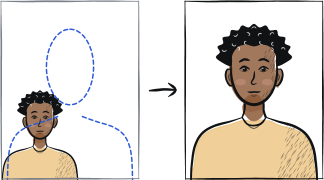
Common checks include a file that is not exactly 200 × 200 pixels or falls outside the 5-100 KB band, a face that does not take up the required 70-80% of the image — about 1.4 × 1.6 inches chin to crown — with the shoulders showing, and headwear worn for a non-religious reason: the portal states head wear is generally not permitted, with an exception only for religious reasons and only when the full face stays visible.
7 common rejection checks
Photo not exactly 200 × 200 pixels
The eVisa portal is digital-only and checks the exact pixel grid on upload. A rectangular photo, or a square photo at a different pixel size, is rejected before you can proceed to payment.
File outside the 5-100 KB range
The portal checks file weight as well as dimensions. A modern phone photo saved at high quality is usually well above 100 KB and needs compressing; a file under 5 KB is too degraded and is rejected too.
Face not filling 70-80% of the frame
The specification calls for a close-up of the face and the top of the shoulders, with the face taking up 70-80% of the image — about 1.4 × 1.6 inches from chin to crown. A wider, waist-up portrait shows too little face and is rejected.
Background not plain white, or other people or objects visible
The rule requires a white background with no pattern and no shadows, and states the photo must show only the applicant — no other people or objects in the frame.
Head tilted or turned, or ears and cheeks not visible
The portal asks for a straight, forward-facing photo showing both ears and cheeks clearly. A three-quarter turn or a tilted head is rejected even when the background and lighting are correct.
Hair covering part of the face
For voluminous hair, the published rule is that the head and hairstyle must be shown in full without reducing the size of the face — a fringe or loose hair crossing the forehead or cheeks causes the same rejection as a physical head covering.
Head covering worn for a non-religious reason, or face not fully visible under it
Head wear is generally not permitted; the stated exception is for religious reasons only, and even then the face must stay visible from the tip of the chin to the forehead. A cap, hat or fashion headscarf outside that exception is rejected.
5-step recovery checklist
Crop and export the photo at exactly 200 × 200 pixels, then check the file lands between 5 and 100 KB before upload.
Frame a close-up of your face and the top of your shoulders so your face fills 70-80% of the square, not a wider waist-up shot.
Shoot against a plain white background with no pattern, shadow, or other person or object in the frame.
Face the camera straight on, head level, with both ears and cheeks visible — no three-quarter turn or tilt.
Pull hair back from your face, or if wearing a religious head covering, make sure your face stays fully visible from chin to forehead.
Frequently asked questions
01What exact size does a Saudi eVisa photo need to be?
Exactly 200 × 200 pixels, with a file size between 5 and 100 KB. The portal checks both numbers automatically on upload, so a photo that is the right shape but the wrong file weight is rejected just as often as one with the wrong dimensions.
02Can I wear glasses in a Saudi eVisa photo?
The published specification does not list a specific glasses rule, only that the face and eyes must be shown straight toward the camera. Since the portal is silent on eyewear, the safer choice is to remove sunglasses and tinted lenses and, if you wear prescription glasses, make sure there is no glare and the frame does not cover your eyes.
03Can I wear a hijab or other religious head covering in the photo?
Yes. The portal states that head wear is generally not permitted, with an exception for religious reasons — but even with a covering, your face must remain visible from the tip of the chin to the forehead. A covering that shadows or crosses the face is rejected the same as any other head covering.
Other rejection guides





Show all 33Collapse










Official sources
Verified .
Reshoot in 2 minutes
Upload a fresh portrait — Anfas.Pro applies the correct crop, background and biometric framing automatically and shows the result before you pay.