South Africa passport photo rejected — DHA reasons and how to fix each
Start with the question that decides whether any of this applies to you: inside South Africa you do not bring a printed photo at all. Home Affairs stopped manual passport processing, and a branch visit is required so the office can capture your photo, fingerprints and signature at the counter. Printed photographs belong to applications made through a mission abroad — and there the country publishes two specifications that do not quite match. The Department of Home Affairs' own photograph leaflet asks for a light grey or plain cream-coloured background and a photo no more than one month old, while missions such as the one in Ottawa ask for a white background and more copies.
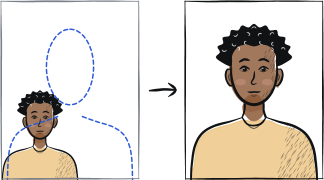
Fast diagnosis
Key checks: printing a photo you do not need, wrong background colour for your channel, photo older than 1 month
The first check is whether you need a printed photo at all: inside South Africa the photo, fingerprints and signature are captured at the branch counter, so prints are wasted money. If you are applying through a mission abroad, the causes are using a white background when the DHA leaflet actually asks for light grey or plain cream (or the reverse, for missions that specifically want white), a photo older than the unusually strict one-month window, and glasses with dark tint, heavy frames or lens glare.
7 common rejection checks
Bringing printed photos to a South African branch that captures them live
Home Affairs stopped manual passport processing: inside South Africa the photo, fingerprints and signature are all captured at the counter of a live-capture office or a participating bank branch. The printed-photo rules below apply when you apply through a mission abroad, not when you walk into a branch at home.
Background colour or photo count wrong for your mission
The Department of Home Affairs' own photograph specification asks for a light grey or plain cream-coloured background and two identical photos, while some overseas missions — Ottawa among them — ask for a white background and four. A photo shot for the wrong channel is rejected even though both versions are, in their own context, correct, so read the instructions of the mission actually handling your application.
Photo older than 1 month
DHA's own leaflet states photos must be not more than one month old — a far tighter window than the six months most other passport authorities allow. A photo that still looks like you but was taken two or three months ago is rejected on this rule alone.
Glasses with tint, heavy frames or glare
Glasses are allowed, but the frame must not cover any part of the eyes, there must be no flash reflection off the lenses, and dark-tinted lenses or heavy frames are rejected. Clear, thin-framed glasses photographed under even light are the safest option if you cannot remove them.
Head covering not for religious reasons
A hat or other head covering is rejected unless worn for religious reasons, and even then the full face from chin to forehead and both edges of the face must stay clearly visible.
Expression not neutral
The specification explicitly rejects obvious grinning, frowning or raised eyebrows, in addition to the standard no-smile rule. Look directly at the camera with a neutral expression and mouth closed.
Home-printed photo of poor quality
DHA's own guidance warns that photographs printed at home are not likely to be of an acceptable quality. Ink marks, creases or washed-out colour from a home inkjet printer are a common, avoidable rejection cause — use a professional print service instead.
5-step recovery checklist
Applying inside South Africa, the branch or participating bank captures your photo, fingerprints and signature at the counter.
Applying through a mission abroad, match that mission's own background colour and photo count rather than assuming white and two.
Take the photo as close to your application date as possible — the DHA leaflet's limit is one month, not six.
Keep glasses on only if the frame does not cover your eyes and there is no glare — remove dark-tinted lenses or heavy frames entirely — and hold a neutral expression, mouth closed, facing the camera square-on.
Use a tool that exports a light grey, cream or white 35 × 45 mm photo (head 29-34 mm chin-to-crown, about 70-80% of the frame, matching your channel) at professional print quality rather than a home inkjet print.
Frequently asked questions
01Does South Africa want a white or a grey background for the passport photo?
It depends on where you apply. The Department of Home Affairs' own photograph leaflet asks for a light grey or plain cream-coloured background, while some overseas missions, including the one in Ottawa, ask applicants for a white background instead. Match the specific instructions from the office or mission handling your application rather than a generic template.
02How recent does a South African passport photo need to be?
DHA's own leaflet states not more than one month old for a standard application — much stricter than the six-month window many other passport authorities allow. Plan to take the photo as close as possible to the date you actually submit your application.
03Can I wear glasses in my South African passport photo?
Yes, unlike some other countries. DHA guidance allows glasses as long as the frame does not cover any part of the eyes and there is no flash reflection off the lenses. Dark-tinted lenses or heavy frames are not permitted.
Other rejection guides





Show all 33Collapse









Official sources
Verified .
Reshoot in 2 minutes
Upload a fresh portrait — Anfas.Pro applies the correct crop, background and biometric framing automatically and shows the result before you pay.