Green Card Lottery (DV) photo rejected — reasons and how to fix each
The Green Card Lottery (Diversity Visa, or DV, program) is run by the US Department of State, not USCIS, and its photo rules are entirely separate from the USCIS biometrics changes that affect Green Card, work permit and naturalization filings. Two things changed recently: since 16 October 2025 every entry carries a $1 electronic registration fee, and the DV-2027 registration period did not open on the usual autumn schedule — the Department of State is revising the entry process and will announce the start date. A DV entry photo is then checked twice: once by an automated system at submission, and again later by a Department of State employee — and the second check is the one that catches most rejected photos.
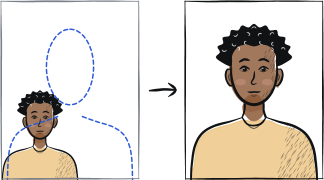
Fast diagnosis
Key checks: reusing last year's photo, file outside the pixel/size spec, glasses worn
Submitting the same photograph you used in a prior year's entry is itself grounds for disqualification, and it is the mistake repeat entrants make most. Next comes the file: a square 24-bit JPEG of exactly 600 × 600 pixels, 240 KB or less, compressed no harder than 20:1. Then glasses, which are not permitted at all. The file check happens at upload; the composition is judged separately, and you are never told that the photo was the reason.
7 common rejection checks
Digital file outside the accepted pixel range, over 240 KB, or greyscale
The Department of State requires a square JPEG in 24-bit colour, exactly 600 × 600 pixels, with a file size of 240 KB or less. If the file is compressed, the compression ratio must not exceed 20:1 — squeezing a large photo hard to reach the 240 KB cap is a common way to fail. A black-and-white or greyscale scan is rejected outright.
Reusing the photograph from a previous year's entry
The Department of State disqualifies an entry that submits the same photograph used in a prior year. Even if the old photo still meets every specification and still looks like you, it has to be a new one for each entry period — this is one of the most common mistakes among people who enter repeatedly.
Auto-scan passes, but the photo fails the later content review
The upload system mainly checks file format and dimensions, not composition, so a wrong background colour or an incorrect head size can still upload successfully. The Department of State notifies entrants only through Entrant Status Check — there is no message telling you the photo was the problem.
Background not plain white or off-white
The same rule as a US passport photo applies. A colour background, patterned wall or visible shadow behind the head is a common cause of rejection.
Glasses worn
Eyeglasses are not permitted in a DV entry photo at all. The only exception is a rare medical circumstance such as recent eye surgery, and that requires a signed medical statement. Do not rely on a glare-free pair — take the photo without eyewear. Hearing devices and similar articles may be worn.
Photo older than 6 months, or a scanned print that does not match the digital spec
If you scan an existing photo instead of taking a new digital one, the source print must be exactly 2 × 2 inches (51 × 51 mm) and scanned at 300 pixels per inch — a photo scanned at a lower resolution or cropped from a different size fails the digital-quality check.
Submitting more than one entry
US law allows only one entry per person per registration period. The Department of State's systems are built to detect duplicates, and a second entry disqualifies every entry you submitted that year — including the first, correct one. The reverse matters just as much: if you never received a confirmation number, your entry was not recorded and you should submit it again. Attempts the system rejected before a confirmation number was issued do not count as duplicates.
5-step recovery checklist
Take a fresh digital photo rather than scanning an old print, unless that print is exactly 2 × 2 inches and you scan it at 300 ppi.
Crop to an exact 1:1 square and check the file is exactly 600 × 600 pixels and under 240 KB before uploading.
Shoot against a plain white or off-white wall with no glasses and a neutral expression — this is the part the upload check does not verify for you.
Enter only once per registration period, and only through dvprogram.state.gov — but if no confirmation number ever arrived, your entry was not recorded, so submit it again.
Use a new photograph for every entry period: submitting the same one you used in a prior year is itself grounds for disqualification.
Frequently asked questions
01What is the maximum file size and pixel dimensions for a DV Lottery photo?
The Department of State requires a square JPEG in 24-bit colour, exactly 600 × 600 pixels, with a file size of 240 KB or less. If the file is compressed, the compression ratio must not exceed 20:1. Resize the photo to 600 × 600 pixels before you save the JPEG, rather than compressing a full-size image down to 240 KB.
02My photo uploaded successfully — does that mean it passed?
No. The upload step mainly checks file format, aspect ratio and size. Composition problems such as the wrong background colour or an incorrect head size are judged separately by a Department of State employee, and the Department communicates results only through Entrant Status Check. There is no message telling you the photo was the reason, so check your entry against the composition rules before you submit rather than after.
03Has the DV Lottery photo requirement changed because of the new USCIS biometrics policy?
No. The Green Card Lottery is run by the Department of State, a different agency from USCIS. The December 2025 change that moved Green Card, work permit and naturalization photos to USCIS biometrics appointments does not apply to DV entries — you still upload your own digital photo at dvprogram.state.gov.
Other rejection guides





Show all 33Collapse

















Official sources
Verified .
Reshoot in 2 minutes
Upload a fresh portrait — Anfas.Pro applies the correct crop, background and biometric framing automatically and shows the result before you pay.