Indonesia visa photo rejected — eVisa portal reasons and how to fix each
Indonesia publishes far less about its eVisa photo than most countries, and the one hard number it does publish is the one applicants miss: the file must be no larger than 200 KB. A modern phone photo is 3-5 MB, more than fifteen times over, so it will not upload at all until it is compressed. Beyond format and file size, Imigrasi does not publish a full photo specification, and much of what circulates online — a red background, an exact face proportion — either belongs to a different Indonesian document or comes from a hint inside the upload form rather than from a published rule.
Fast diagnosis
Key checks: file over 200 KB, background mix-up, framing hint inside the upload form
The check that stops most applications is the 200 KB file ceiling published on the eVisa portal — the same limit applies to the scan of your passport biodata page, which is the second thing that fails. The background mix-up is next: the red background people remember from Indonesia belongs to the KTP-el national ID card and to foreigners' stay-permit papers, not to a visa photo. Everything else the portal checks is the ICAO baseline any biometric system applies.
7 common rejection checks
File over the 200 KB limit
The official eVisa requirements list a passport-size photograph in JPG, JPEG or PNG with a maximum size of 200 KB. A modern phone photo is 3-5 MB, more than fifteen times over, and has to be compressed before it will upload at all.
Passport biodata scan also over 200 KB
The same 200 KB ceiling applies to the scan of your passport biodata page, which the portal asks for in the same formats. Applicants compress the portrait, forget the passport scan, and the submission stalls on the second file.
Background mix-up with the red KTP-el photo
The eVisa photo needs a plain, evenly lit background with no pattern, shadow or second person. The red background people remember from Indonesia is not the passport: it belongs to the KTP-el national ID card — red for an odd birth year, blue for an even one — and to foreigners' stay-permit documents. White is the safe choice, though the portal does not name a colour.
Reading the on-screen framing hint as a published rule
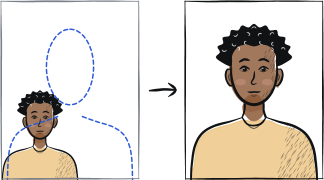
The upload form itself shows a framing hint — chin-to-crown between 50% and 60% of the image height, looser than the 70-80% many applicants know from other visas — along with a suggested pixel size. Imigrasi does not publish either figure outside the form, so read what the upload screen tells you at the moment you apply rather than trusting a number from elsewhere.
Photo taken as a selfie or in a non-passport style
Imigrasi does not publish a full photo specification for the eVisa; what the portal actually checks is format and file size. The rest is the ICAO baseline every biometric check applies, and it starts here: a formal, passport-style photograph rather than a casual selfie. A shot taken at arm's length with a front-facing camera carries wide-angle distortion that changes your facial proportions.
Shadow, glare or another person visible in the frame
Also from the ICAO baseline rather than from a published Indonesian rule: the photo should show only you, evenly lit, with no shadow on the face or background. A second person partly in frame, or a shadow falling across the backdrop, is a common reason an otherwise correct photo is sent back.
Glasses causing glare or hiding the eyes
Imigrasi publishes no glasses rule for the eVisa photo. The ICAO baseline every biometric system applies requires both eyes to be clearly visible with no glare, so tinted or dark lenses, or a reflection across the lens, are treated the same as eyes that cannot be seen — removing glasses is the safer choice if you are unsure.
5-step recovery checklist
Export as JPG and compress until the file is under 200 KB — the limit published on the eVisa portal — while keeping the face sharp.
Compress the scan of your passport biodata page to under 200 KB as well; it is the second file that stalls submissions.
Shoot against a plain, evenly lit background with no shadow, no pattern and no one else in frame — white is the safe choice.
Read the framing hint on the upload screen itself and crop to what it shows, rather than reusing a crop made for another country's visa.
Use the rear camera on a tripod or steady surface rather than a front-facing selfie shot, and take the photo recently enough that it still looks like you.
Frequently asked questions
01Does the Indonesian visa photo need a red background?
No, and the mix-up is worth clearing up. The red background belongs to Indonesia's KTP-el national ID card — red for residents born in an odd year, blue for an even year — and to foreigners' stay-permit paperwork. Indonesian passports use a plain light background like most ICAO documents, and the visa photo you upload is a separate thing again. Imigrasi does not name a colour for it, so a plain, evenly lit white backdrop is the safe reading.
02What is the file size limit for an Indonesia eVisa photo?
200 KB. The eVisa portal lists a passport-size photograph in JPG, JPEG or PNG with a maximum size of 200 KB, and the same ceiling applies to the scan of your passport biodata page. This is the single most common reason a submission stalls: a phone photo straight from the camera roll is fifteen to twenty-five times over the limit and simply will not upload.
03Can I wear glasses in an Indonesia eVisa photo?
Imigrasi does not publish a glasses rule for the eVisa photo — the portal checks format and file size, not eyewear. What applies instead is the ICAO baseline used by every biometric check: both eyes clearly visible with no glare. Since tinted lenses or a reflection are treated the same as hidden eyes, removing glasses is the safer choice unless you are certain your lenses are completely glare-free.
Other rejection guides





Show all 33Collapse















Official sources
Verified .
Reshoot in 2 minutes
Upload a fresh portrait — Anfas.Pro applies the correct crop, background and biometric framing automatically and shows the result before you pay.