India Aadhaar photo rejected — UIDAI reasons and how to fix each
Aadhaar enrolment does not work like a passport application: there is no photo to print or upload. UIDAI (Unique Identification Authority of India) captures your photo live at the enrolment centre as part of the same biometric step that records all ten fingerprints and both iris scans. Ordering a studio print in advance is wasted money — but a poor capture at the centre still means a second visit.
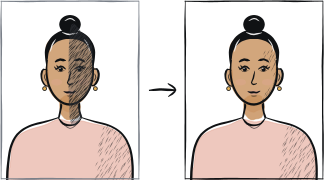
Fast diagnosis
Key checks: bringing a studio photo, dark glasses, face not fully visible
A common mistake is preparing a printed photo that Aadhaar enrolment simply does not use — the operator captures your face live at the centre. Of the capture itself, the top causes of a poor result are dark or tinted glasses left on, and a face partly hidden by hair, a veil or an accessory when the camera fires.
7 common rejection checks
Bringing a studio-printed photo to the enrolment centre
UIDAI captures the enrolment photo live, at the centre, using the operator's own camera, as part of the same biometric step that records your ten fingerprints and both iris scans. A printed or digital photo you bring is not used for the standard enrolment — save the money a studio would charge.
Dark or tinted glasses left on for the capture
UIDAI's enrolment guidance asks operators to have dark or tinted glasses removed before the photo is taken, along with any accessory that covers part of the face. Clear prescription glasses are the safer choice if you need them to see the screen.
Face partly covered by hair, a veil or an accessory
The full face needs to be visible for the capture. UIDAI's operator guidance specifically asks a woman wearing a purdah or face-covering veil to reveal her full face for the photo — the enrolment cannot proceed with the face hidden.
Smiling or an unsteady expression
Operator guidance asks for a neutral, non-smiling expression with the teeth closed and both eyes open, looking into the camera. A relaxed, still expression gives the sharpest capture on the first attempt.
Shadows from harsh overhead lighting at the centre
UIDAI's own training material warns that a light positioned directly above the enrolee casts shadows across the eye sockets, and asks operators to use diffused light placed in front instead. A busy centre with poor lighting is a common reason for a blurry or shadowed capture.
Motion blur or an out-of-focus capture
The enrolment software checks for a sharp, correctly exposed image before it accepts the photo. Staying still, keeping your eyes open and waiting for the operator's signal avoids the common reason a capture has to be repeated on the spot.
Expecting a bad photo to be fixed online later
If the photo on your Aadhaar card or in the mAadhaar app looks wrong, there is no online upload to correct it. A photo or biometric update can only be done in person, at an Aadhaar Enrolment Centre or Aadhaar Seva Kendra, where the operator captures a fresh image.
5-step recovery checklist
Do not order or bring a printed photo — the enrolment centre photographs you on the spot, free for a first enrolment.
Remove dark or tinted glasses before the operator starts the capture; keep clear prescription lenses on only if you need them to see.
Uncover your full face — pull back hair, and lift a veil or face-covering away from the eyes, nose and mouth for the photo itself.
Keep a neutral expression with your mouth closed and both eyes open, and hold still until the operator confirms the shot is sharp.
If an existing photo looks wrong, book an in-person visit to an Aadhaar Enrolment Centre or Seva Kendra for a biometric update — it cannot be fixed by uploading a new photo yourself.
Frequently asked questions
01Do I need to bring my own photo to Aadhaar enrolment?
No. UIDAI captures the photo live at the enrolment centre as part of the same biometric step that records your ten fingerprints and both iris scans. A first enrolment is free, so there is no photo, and no photo cost, to prepare in advance.
02Can I fix a bad Aadhaar photo by uploading a new one online?
No. Photo and biometric updates are handled in person only, at an Aadhaar Enrolment Centre or Aadhaar Seva Kendra, where an operator captures a fresh image. There is no online option to replace just the photo on an existing Aadhaar.
03What if I cannot remove my glasses or need to keep my face partly covered?
UIDAI's operator guidance asks for dark or tinted glasses to be removed and the full face to be shown, including for a woman wearing a purdah, who is asked to reveal her face for the photo itself. A head covering can generally stay in place as long as it does not hide the face.
Other rejection guides





Show all 33Collapse

















Official sources
Verified .
Reshoot in 2 minutes
Upload a fresh portrait — Anfas.Pro applies the correct crop, background and biometric framing automatically and shows the result before you pay.